Bikin FinFeatures
Month close
Run the monthly checklist in Bikin Fin, lock the period so figures can't change, and unlock it with a reason when needed.
Month close (sidebar, Reports group) makes sure a month's books are in order, then locks that period so reports already sent to your accountant or the tax office don't change quietly. Under the title, you can see up to which date the books are locked (Locked up to …).
Monthly checklist
Pick the month in the month box under the title. Bikin Fin checks the books and marks what is done (green tick) and what isn't (red mark), with a count of open items above the list.
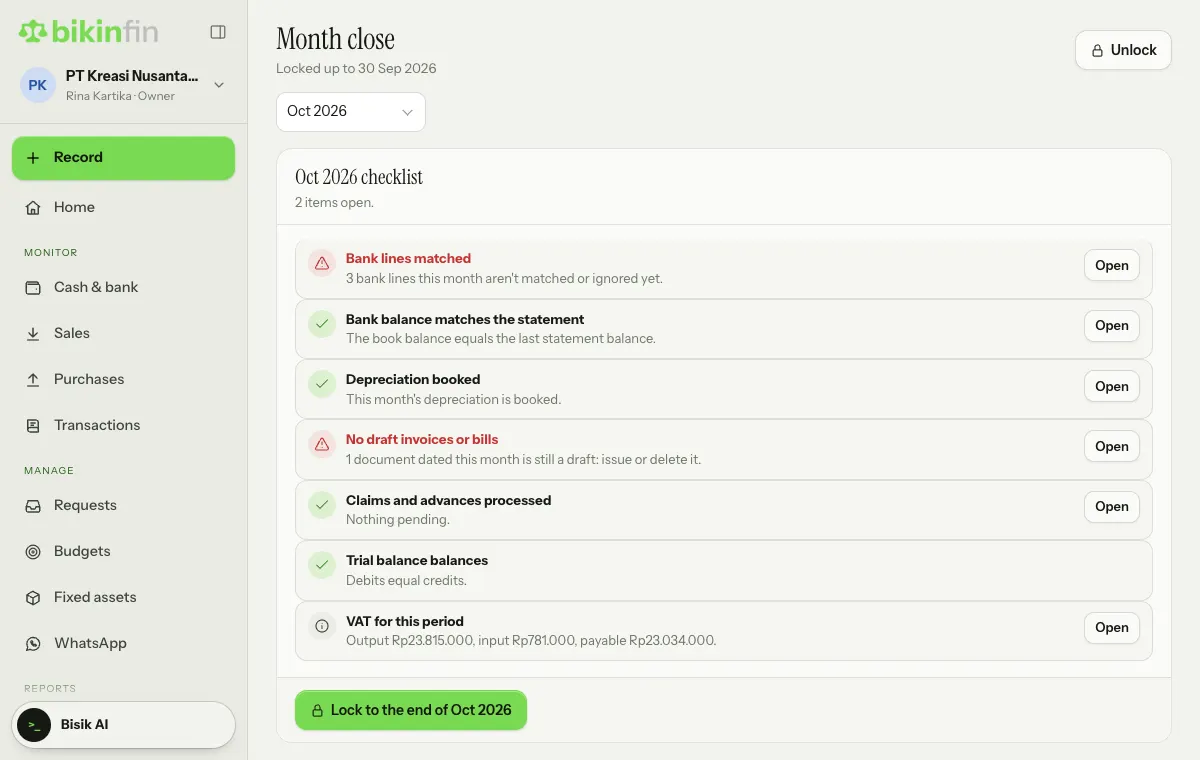
What each check means:
| Check | Meaning |
|---|---|
| Bank lines matched | Every bank line for the month is matched or ignored |
| Bank balance matches the statement | The book balance equals the last balance on the imported statement |
| Depreciation booked | Depreciation for every asset up to that month is booked |
| No draft invoices or bills | Documents dated that month are issued or deleted |
| Claims and advances processed | Approved requests have been paid |
| Trial balance balances | Total debits equal total credits |
Some rows are just notices (the i icon), e.g. employee advances not yet accounted for, Opening balance equity that isn't empty (ask your accountant to move it to Capital or Retained earnings), and the VAT recap for the period.
On a row that isn't done, choose Open to go to the page where you can fix it.
Locking a period
- When everything is done, choose the Lock to the end of … button under the checklist (it names the month you picked).
- Enter the code from your email.
If some items are still open, Bikin Fin shows Some items are still open. Choose Check first to go back, or I've reviewed them, lock to lock anyway. The lock is logged in the history with that note.
Once locked, transactions dated up to the end of the locked period can't be recorded, edited, corrected or voided. This applies everywhere, including Record, Upload proof, depreciation and recurring invoices (dates in a locked period move to the first open day).
There are no closing entries: last year's profit flows into Retained earnings on the balance sheet automatically.
Unlocking
Sometimes an invoice gets missed. The owner can choose Unlock at the top right, pick Reopen from, and write a Reason (e.g. "An October invoice was missed"). It needs an email code and is logged.
That month and later can be changed again. Keep in mind that reports already sent to your accountant or the tax office may then differ.
History
The History section records every lock and unlock: who, when, up to which month, and why.
Who can do this
| Action | Role |
|---|---|
| See the checklist | Owner, Finance manager, Accountant, staff with Reports access |
| Lock a period | Owner, Finance manager |
| Unlock | Owner only |
Make closing a habit at the start of each month: import the statement, match bank lines, book depreciation, issue or delete drafts, then lock. That month's reports are ready for your accountant.
Last updated: