Bikin FinFeatures
Fixed assets
Register vehicles, equipment and buildings in Bikin Fin, book monthly depreciation, print QR labels, remeasure, and sell or write off assets.
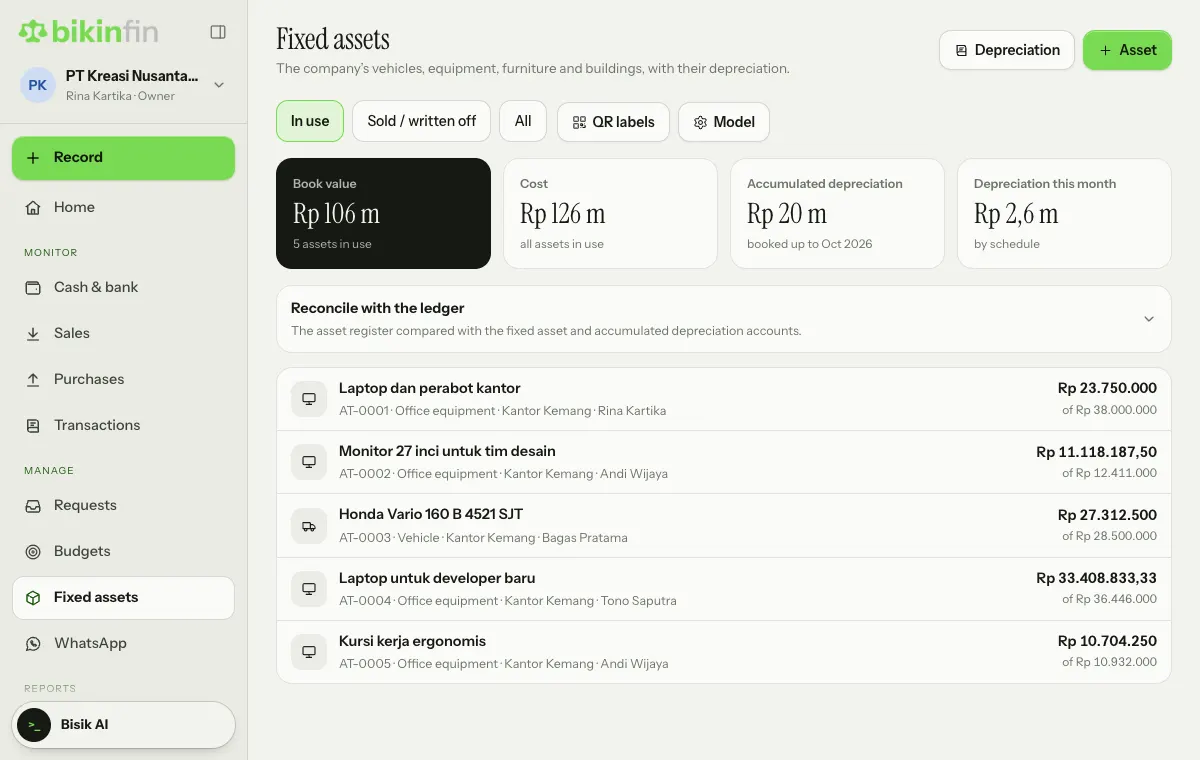
Fixed assets (sidebar, Manage group) holds the company's vehicles, equipment, furniture, land and buildings, with their depreciation. This feature is available if your plan includes fixed assets.
Above the list are the In use, Sold / written off and All filters, the QR labels and Model buttons, then four key numbers: Book value, Cost, Accumulated depreciation and Depreciation this month. Each asset row shows its AT number, category, location and person in charge.
Registering an asset
You register an asset after its purchase is recorded (through a vendor bill, money out or opening balances). Registering an asset doesn't create a new journal.
- Open Fixed assets and choose + Asset at the top right (or Register an asset if the list is still empty).
- Fill in the Asset name, Category, Acquisition date and cost.
- Choose the Depreciation method (Straight line, Double declining or Not depreciated), Useful life (months), Residual value and Depreciation starts. The category fills in its defaults.
- Check the Asset account, Accumulated depreciation account and Depreciation expense account.
- Choose the Tax group and Tax method for tax depreciation.
- Fill in the location, Person in charge, Serial / plate number, Warranty until, division or project, and a photo if needed.
- Add reminders (vehicle tax, insurance, service, warranty, property tax), once or repeating.
- Choose Save.
Older assets already depreciated before the books started in Bikin Fin: tick that option and enter the accumulated depreciation as of the end of a given month. This figure should match the accumulated depreciation in your opening balances.
From a vendor bill
In an issued vendor bill's detail, lines on a fixed asset account have a Make it an asset button. The form opens with the name, cost, date, accounts and source bill.
Book and tax depreciation
Every asset has two schedules side by side:
- Book: for the books and financial statements.
- Tax: under the Income Tax Law article 11 (groups 1–4 and buildings), for the tax reconciliation in the corporate return. The difference is adjusted in the return, not in the books.
Tap an asset in the list to see its Depreciation schedule per year.
Booking monthly depreciation
If depreciation up to last month isn't fully booked, the Fixed assets page shows a notice with a Book it now link. Choose that link or the Depreciation button at the top right. In the Book depreciation popup, pick Up to, check the preview, then Create journals. Bikin Fin makes one journal per month: depreciation expense against accumulated depreciation.
Skipped months, assets registered later or voided journals are caught up automatically in the next journal. Once depreciation is booked, the cost, accounts and start are locked; a new useful life or method applies from the next month.
Reconcile with the ledger
The Reconcile with the ledger card above the list compares the asset register with the fixed asset and accumulated depreciation balances in the ledger. Its status shows without opening it: Matches or Differences. Tap the card to see the figures per account and change the As of date.
Differences usually come from asset purchases not yet registered, assets registered without their purchase, or manual journals to that account.
History and QR labels
- In an asset's details, choose Log to add to its history: Move / new owner, Service or Note. This is a history note, not a financial transaction; the service cost is still recorded with the Record button above the menu, as money out or a vendor bill.
- QR labels: choose QR labels above the list, print, cut and stick. Scanning a label opens that asset's card in Bikin Fin (sign-in needed).
- Reminders email the owner, manager and accountant a week before and on the day.
Remeasuring
Choose Model above the list to set the measurement model per asset category: Cost (default) or Revaluation, as SAK EP allows.
Choose Remeasure in an asset's details to record:
- Cost model: a value below book value is an impairment loss. A higher value only reverses an earlier impairment.
- Revaluation model: increases go to the revaluation surplus in equity (unless they reverse an earlier loss), decreases use that asset's surplus first.
Later depreciation runs from the new value over the remaining life. Remeasuring needs an email code. The last measurement can be undone as long as no depreciation has been booked after it and its period isn't locked.
Selling or writing off
Assets that are sold, broken or lost are disposed of, not deleted. In the asset's details, choose Sell / write off, pick sold or written off, the date, sale price and the account the money goes into. Depreciation up to the disposal month is booked first, then the gain or loss is calculated automatically. Needs an email code.
Deleting an asset record is only for assets registered by mistake.
Who can do this
The owner and finance manager register, edit, remeasure and dispose of assets. The owner, manager and accountant book depreciation. Finance staff can see the asset list.
Last updated: