Bikin FinFeatures
Tax & Coretax
Tax calendar with reminders, VAT and withholding recap per period, and XML export to import into Coretax. Paying and filing stay with you.
The Tax page (sidebar, Reports group) helps your company prepare its tax obligations. Bikin Fin calculates and reminds; paying and filing still happen at the bank and in Coretax, by your company or your tax adviser. This page is only for companies that use Indonesian rupiah (IDR); with another currency it is locked, and asset reminders stay in Fixed assets (see Currency).
Bikin Fin doesn't pay or file tax for you, and its tax figures are aids, not tax advice. Check the results with your accountant or tax adviser before filing.
The Tax page has the tabs Calendar, Period recap, Coretax export and Settings.
Calendar
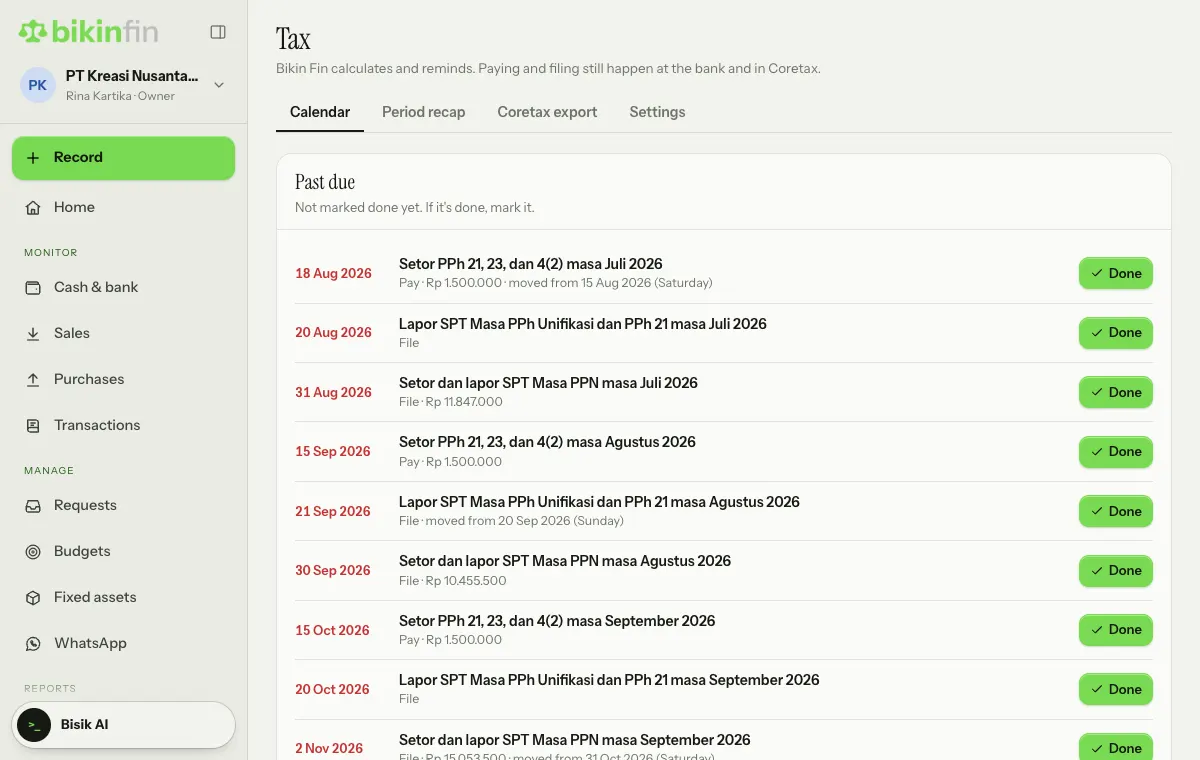
The calendar shows obligations for the next two months, grouped into Past due, Coming up and Done. Each row shows the date, the obligation, whether it is a Pay or File step, and the amount once the books have worked it out. Dates follow the Coretax rules (PMK 81/2024):
- pay monthly income tax by the 15th,
- file by the 20th,
- VAT by the end of the next month,
- the PPh 25 instalment if you set one,
- the corporate annual return by the end of the fourth month after the fiscal year.
Dates on a Saturday, Sunday, national holiday or collective leave day move to the next working day, with a "moved from" note. Regional holidays can be added in the Settings tab.
After handling an obligation, choose Done on the right of its row; a mistaken mark can be reversed with Undo. Email reminders go to the owner, manager and accountant three days before and on the day.
Period recap
Pick a month to see:
- Output VAT from VAT invoices issued in that period, and Input VAT from vendor bills with VAT. The result is VAT payable or overpaid. Only input VAT with a tax invoice from the vendor can be credited.
- Tax we withheld when paying vendors: the source for PPh 23, 4(2) and PPh 21 non-employee withholding slips.
- Tax withheld by customers: ask customers for the slips; they become tax credits in the annual return.
- Final tax 0.5% (PP 55) on turnover, if switched on in Settings.
If the company isn't VAT-registered, the recap has no VAT. Change its status in Company › Company details once it is registered.
Coretax export
This tab builds XML files to import into Coretax (if your plan includes the Coretax export):
| File | Source |
|---|---|
| Download invoice XML | VAT sales invoices in that period |
| Download withholding XML | Vendor payments with PPh 23 or 4(2) withheld |
| Download BP21 XML | Bill payments to individuals with PPh 21 non-employee withheld |
How to use them:
- Complete customer and vendor NPWPs in Contacts. Contacts without an NPWP are exported without one.
- Fill in the tax object codes and PTKP status in the Settings tab.
- Download the files and upload them in Coretax.
- Check the import result in Coretax, then sign and file it yourself.
Files from Bikin Fin are import drafts. Coretax remains the place for the official check and filing. Exporting can be done by the owner, finance manager and accountant.
Tax settings
- Final 0.5% tax on turnover (PP 55/2022): only for entities that still qualify and are within the time limit. Ask your tax adviser.
- Monthly PPh 25 instalment.
- Tax object codes for PPh 23, PPh 4(2) and PPh 21 non-employee, plus the Recipient PTKP status for BP21. Copy the codes from the tax object list in Coretax.
- e-Faktur line defaults: kind (A · Goods or B · Services), goods/service code and unit from the official Coretax list. Used for invoice lines without their own values.
- Extra holidays: regional holidays or other days off outside the national list.
Who can do this
The Tax page is open to the owner, finance manager and accountant, and to staff with the extra Reports access.
Last updated: