Bikin FinHelp
FAQ
Short answers to common questions about Bikin Fin: transfers, tax, posting, opening balances, email codes and more.
Short answers to the most common questions. For questions about your company's numbers, try asking Bisik inside the app.
Money and tax
Can Bikin Fin transfer money to vendors?
No. Bikin Fin never moves money. To pay many vendors, make a payment run in Purchases › Payment run, download its CSV once approved, then upload it yourself in internet banking. See Purchases.
Does Bikin Fin file tax with the tax office?
No. Bikin Fin calculates, reminds and builds XML files to import into Coretax. You or your tax adviser check, sign and file them in Coretax, and pay from the bank. See Tax & Coretax.
How do customers pay invoices?
Customers pay straight into your company's bank account shown on the invoice link. The money doesn't pass through BIKIN. Record the payment with Record › Sales & income › Receive an invoice payment (or Receive payment on the invoice), or match it from your bank lines.
Bookkeeping
Where is the button to record things?
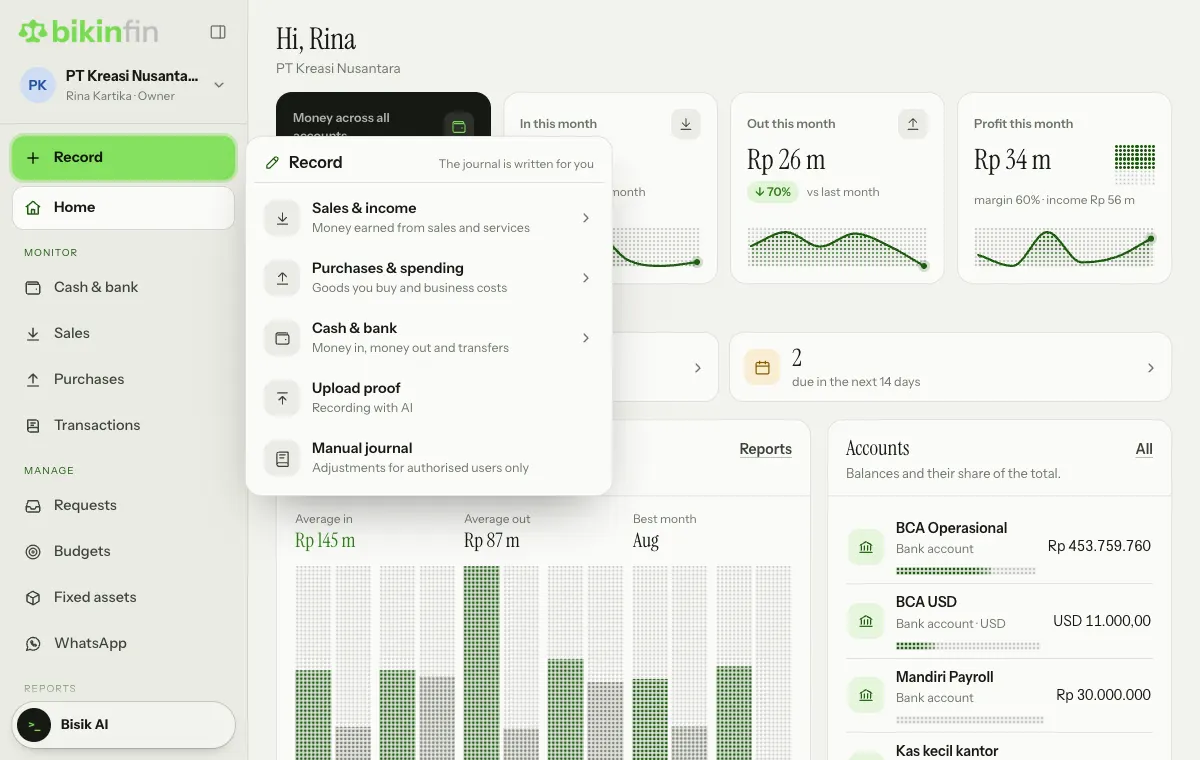
Everything is recorded through the Record button: the green button above the sidebar menu, on computers and tablets and in the sidebar drawer on phones (tap the menu button or swipe right). Cash & bank, Sales, Purchases and Transactions are for monitoring, so they have no record buttons of their own. See Transactions.
Do I need to post or write journals?
Not for everyday transactions. Money in, money out, transfers, invoices, bills, payments, claims and depreciation write their own journals. Manual journals are only for adjustments, usually by the accountant. Reports are always current, and no year-end closing entries are needed.
I recorded something wrong. Can I delete it?
Transactions are never deleted. Open the transaction in Transactions, choose Correct, write the reason, then save the right details. The original stays visible marked Corrected, and the replacement gets a new number. To cancel it without a replacement, choose Void, with a reason and an email code. Invoice, bill and payment journals are corrected through their document. A locked period can't be corrected.
My company has been running for years. How do I start?
Pick a books start date (e.g. the start of this month), then enter opening balances from your last balance sheet or bank statements in Company › Opening balances. Old receivables and payables per customer or vendor can be recorded as old invoices or bills. Older assets are registered with their accumulated depreciation. See Getting started.
Why is there an Opening balance equity account?
Any difference in the opening balances goes there. Ask your accountant to move it to Capital or Retained earnings with a manual journal.
Can one account cover several companies?
Yes. The owner adds companies from the company card above the menu. Each company has its own books; combined reports across companies aren't available. The number of companies follows your plan.
Can I use foreign currencies?
Yes, if your plan includes foreign currency. Accounts, invoices and bills can be in a foreign currency with a rate per transaction, and exchange differences on payment are journalled automatically. Reports stay in the company currency, set on the Currency card (see Currency). Down payments and recurring invoices are in the company currency only.
Does Bikin Fin track stock and payroll?
No. Inventory and payroll aren't in Bikin Fin. Salaries paid outside Bikin Fin can be recorded as money out, and added as a recurring item in the cash forecast.
Account and access
The email code didn't arrive.
Check your Spam folder, then choose Resend code once the countdown ends. If too many codes were requested for one email in a day, try again tomorrow.
Why am I asked for a code again?
Important actions like voiding a transaction or changing a vendor's bank account always ask for an email code. Once the code is right, you won't be asked again for 10 minutes.
A menu described here doesn't appear in my app.
Menus follow your role. Menus your account's plan doesn't include yet still show, with a small lock and a note on how to upgrade. Ask the owner to check your role in Users & roles, or the plan in Settings › Plan. See Roles & access.
I see "Account paused".
Your account's paid plan has ended and you are over the free plan limits. Your data is safe. Ask the owner to renew the plan or pick you in Choose what stays. See Plan & billing.
How do I change the language or theme?
Tap the company card at the top left (your company and your name), then choose Language (Indonesia or English) and Theme (Light or Dark; until you choose, it follows your device). Both are also in Settings › Appearance.
Can I install Bikin Fin on my phone?
Yes. Open Settings › Appearance › Install the app. In Safari on iPhone: tap Share, then Add to Home Screen. Bikin Fin still needs internet.
I want to see the starter guide again.
Open Settings › Account, the Getting started card, then choose Replay the guide to replay the welcome and show Quick start again.
Other help
Contact BIKIN at contact@bikin.studio.
Last updated: