Bikin FinFeatures
Reports
Profit and loss, balance sheet, cash flow, 13-week cash forecast, profit by project, general ledger and the accountant pack in Bikin Fin, always current.
Reports (sidebar, Reports group) are always current from recorded transactions, with no posting. The format follows SAK EP. Reports can be printed from the browser with the Print button and, if your plan includes export, downloaded as Excel with the Excel button.
Available reports
| Tab | What's in it |
|---|---|
| Profit & loss | Income, costs and profit for the chosen period, opening with a trend chart |
| Balance sheet | Assets, liabilities and equity as of a date |
| Cash flow | Direct and indirect method |
| Cash forecast | Estimated cash balance for the next 13 weeks |
| By project | Income, costs, profit and margin for each project |
| General ledger | Movements in each account with a running balance |
In a report table, tap an account row to see its movements. The trial balance is in the Chart of accounts, Trial balance tab.
Choosing the period and comparison
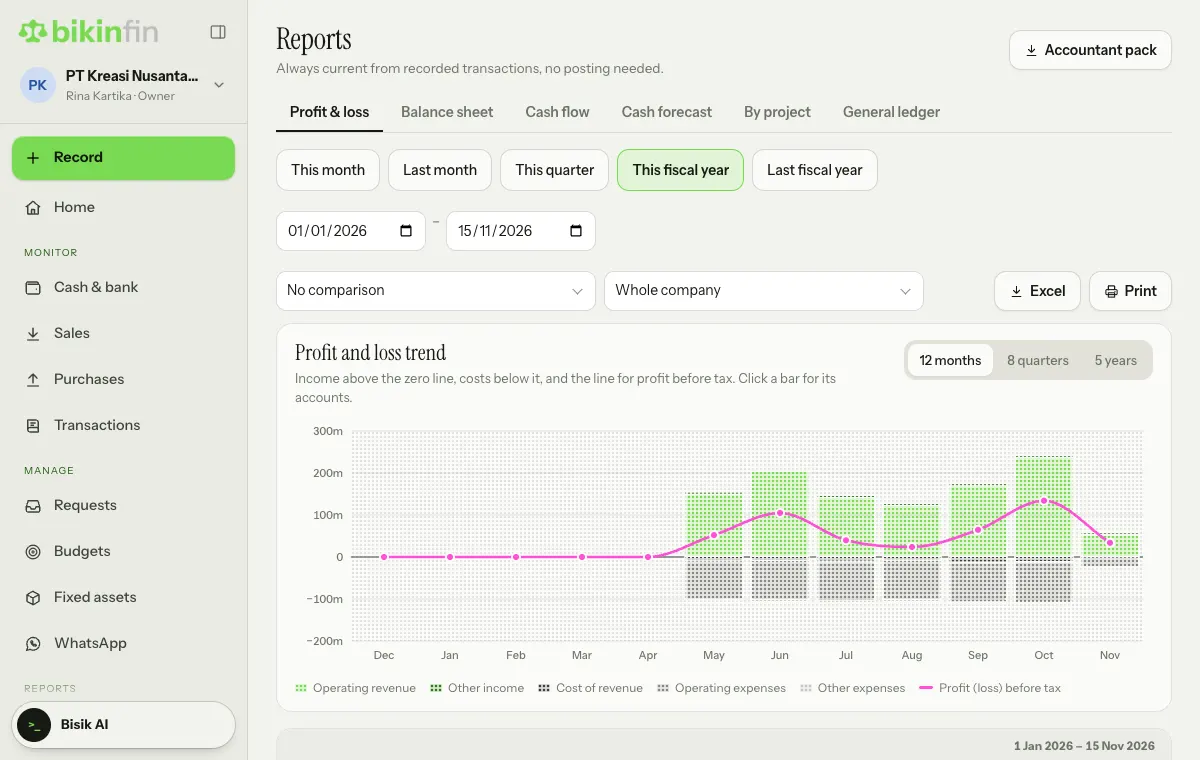
Pick a quick period (This month, Last month, This quarter, This fiscal year, Last fiscal year) or fill in the start and end dates next to them. The balance sheet uses a single date.
- In Profit & loss, the first box (default No comparison) compares with the previous period or last year, and the second box (default Whole company) filters by project or division, if you have any.
- The balance sheet can be compared with last year-end, last month-end, or the same date last year.
Profit from earlier years flows into Retained earnings automatically, and current year profit counts from the start of the fiscal year. No closing entries are needed.
Profit and loss trend
The Profit & loss tab opens with the Profit and loss trend chart: income above the zero line (green), costs below it (grey), and a magenta line for profit (loss) before tax. Choose 12 months, 8 quarters or 5 years at the top right of the chart. Tap a bar to see that period's accounts. The full profit and loss table sits below the chart.
Cash flow
Cash here means accounts in the Cash & bank group. Transfers between your own accounts are left out, and credit cards count as payables.
Cash forecast: how long will our cash last?
The cash forecast estimates the cash balance week by week for the next 13 weeks, from:
- the current cash & bank balance,
- receivables by due date and each customer's usual payment delay,
- vendor bills, approved requests, POs and tax payments,
- the average routine money in and out over the last 3 months,
- recurring items you add yourself.
Choose Assumptions & recurring to set the Safety floor and recurring items not recorded through Bikin Fin, e.g. payroll paid from another app or loan instalments. The forecast shows the lowest point and the first week the balance drops below the safety floor. A summary also appears on Home, in the How long will cash last? card.
The forecast is only an estimate. Nothing is recorded or paid.
Profit by project
The By project tab holds this report if your plan includes projects and divisions; if not, the tab has a lock and an upgrade note. To fill it, tag lines on invoices, bills, money out or claims with a project. If a project has a budget, the report shows budget rows and the profit against budget. Set up projects in Company › Projects & divisions.
Accountant pack
The Accountant pack button at the top right of the Reports page builds one ZIP with the profit and loss, balance sheet, cash flow and trial balance (Excel) plus every journal (CSV) for the period you have chosen. Choose Download ZIP and send it to your accountant or tax adviser. The button shows when you have export permission. If your plan doesn't include export yet, it shows a mini lock and an upgrade note when pressed.
Monday summary
The owner gets a summary email every Monday: balances, the cash forecast's lowest point, overdue receivables, this week's bills, the approval queue and this week's taxes. Its email and push are set in Settings › Notifications.
Who can do this
Reports are open to the owner, finance manager and accountant. Finance staff can be given the extra Reports access in Roles & access. Downloading Excel and the accountant pack needs export permission (owner, manager, accountant) and the export feature in your plan.
Last updated: