Bikin FinFeatures
Bisik in Bikin Fin
Bisik is the AI assistant in Bikin Fin that answers questions about cash, profit, receivables, bills, tax, budgets and using the app, within your role.
Bisik is the AI assistant inside Bikin Fin. Bisik answers questions about the numbers of the company you have open and explains how to use Bikin Fin. Bisik is available on every plan, including Free. How many questions you can ask each month depends on your plan: Free is enough to try it, paid plans give more. When this month's allowance is used up, Bisik tells you, and the owner can upgrade the plan in Settings › Plan.
Opening Bisik
Choose the Bisik AI button at the foot of the sidebar, below the menu. The panel opens from the right edge (full screen on phones), with a greeting and a few suggested questions. Type your question in the Ask about cash, profit, tax… box, or pick one of the suggestions.
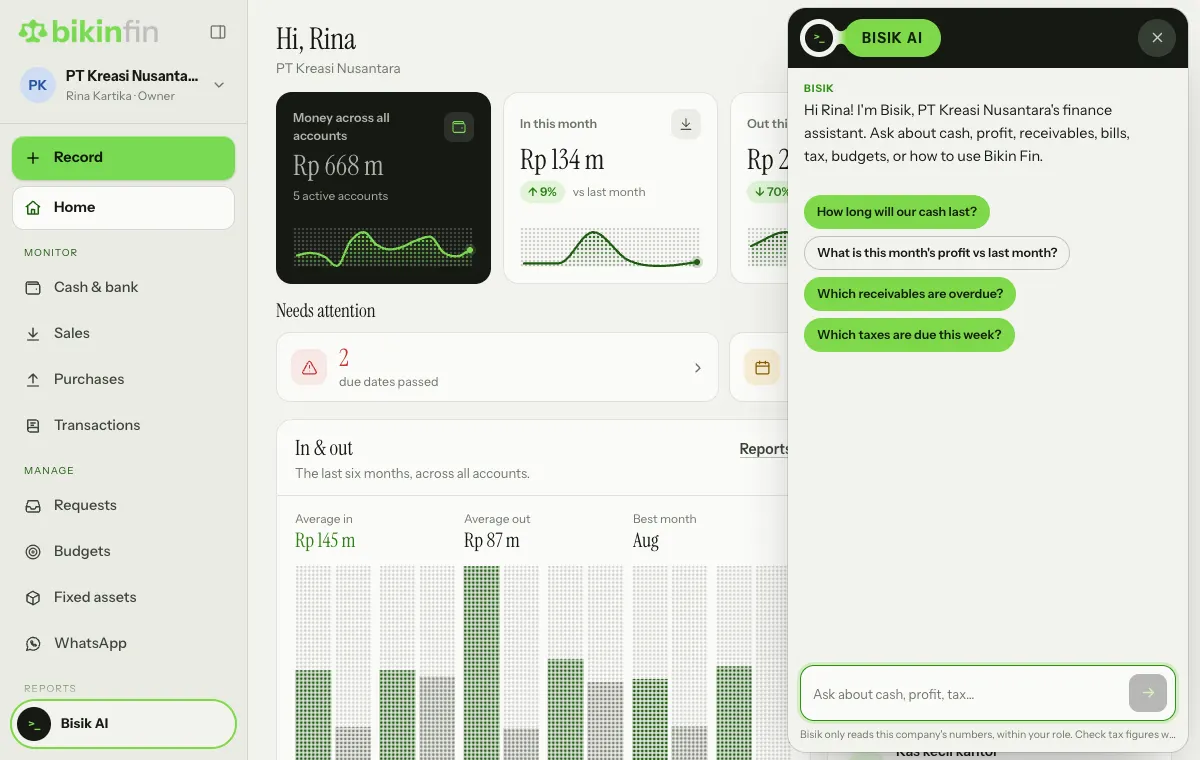
While Bisik is answering, the send button turns into Stop; choose it if you don't need the rest of the answer. To start over, choose the eraser button (New chat) in the panel header; it appears once there is a conversation. Close the panel with the × at the top right.
What you can ask
About the company's finances:
- "How long will our cash last?"
- "What is this month's profit vs last month?"
- "Which receivables are overdue?"
- "Which vendor bills are due this week?"
- "Which taxes are due this week?"
- "What are all the account balances?"
About your own requests:
- "Where are my requests?"
About using Bikin Fin:
- "How do I record money out?"
- "How do I submit a claim?"
- "How do I change my password?"
Bisik reads the cash position, profit and loss, balance sheet, cash forecast, receivables and payables ageing, tax calendar, budgets, and requests waiting for approval.
Bisik's limits
- Read only. Bisik doesn't record, change, pay, send or file anything. To record something, use the Record button; to send an invoice, open it in Sales.
- Within your role. Bisik only answers what you are allowed to see. For example, finance staff without Reports access don't get profit figures, and requesters only see their own requests.
- Only the open company. Switch company from the card above the menu to ask about another one.
- No sensitive data. Bisik never shows bank account numbers, NPWPs or attachments.
- A monthly allowance that follows your plan, and a daily allowance per person and per account. When one is used up, Bisik tells you.
Bisik can be wrong. Check tax figures and other important numbers against the app's reports and with your accountant before using them for decisions or filing.
Bisik in other BIKIN apps
Want to ask about your finances from BIKIN AI or see them in BIKIN SIGHT? Connect those apps to Bikin Fin. See Connected apps.
Last updated: