Bikin POSHelp
FAQ
Short answers to common questions about Bikin POS: offline use, devices, printers, QRIS, delivery apps, staff and plans.
Short answers to questions people often ask. Still stuck? Ask Bisik inside the app, or email support@bikin.studio.
Which devices can I use?
A tablet, phone or computer with a modern browser. Bikin POS opens at pos.bikin.studio and can be added to the home screen from the browser menu.
What if the internet drops?
The register keeps selling. Sales are kept on the device, receipts can still be printed, and everything sends itself once you're online. The only condition is that Bikin POS has been opened on that device while online. Don't clear the browser's data while sales are still waiting to send. Check Sales › Waiting to send.
Why am I asked for an email code when I refund or change staff?
Important actions such as changing staff, outlets, money and security settings, refunds, voids, exports, and passwords and PINs ask for a 6-digit code from your email. Once the code is right, other important actions don't ask again for 10 minutes. For staff without an email, the code goes to the owner's email.
Which printers work?
58 or 80 mm thermal printers. Printers installed on the device (USB or AirPrint) print through the print dialog. Bluetooth printers can print directly from Chrome on Android or a computer; iPhone and iPad don't support Bluetooth in the browser yet. See Settings.
What's the difference between manual and automatic QRIS?
Manual QRIS uses your own QRIS image: the money goes straight to your account, and the cashier checks that it arrived. Automatic QRIS makes a QR with the exact amount for each sale and checks it automatically; the money goes to your Balance in Bikin POS, and you withdraw it to your account. See Payments & receipts.
Is Bikin POS connected directly to GoFood, GrabFood or ShopeeFood?
Not yet. Delivery-app orders are recorded in the register with their order type, by hand or from a screenshot read by AI. See Delivery-app orders.
Can several cashiers share one tablet?
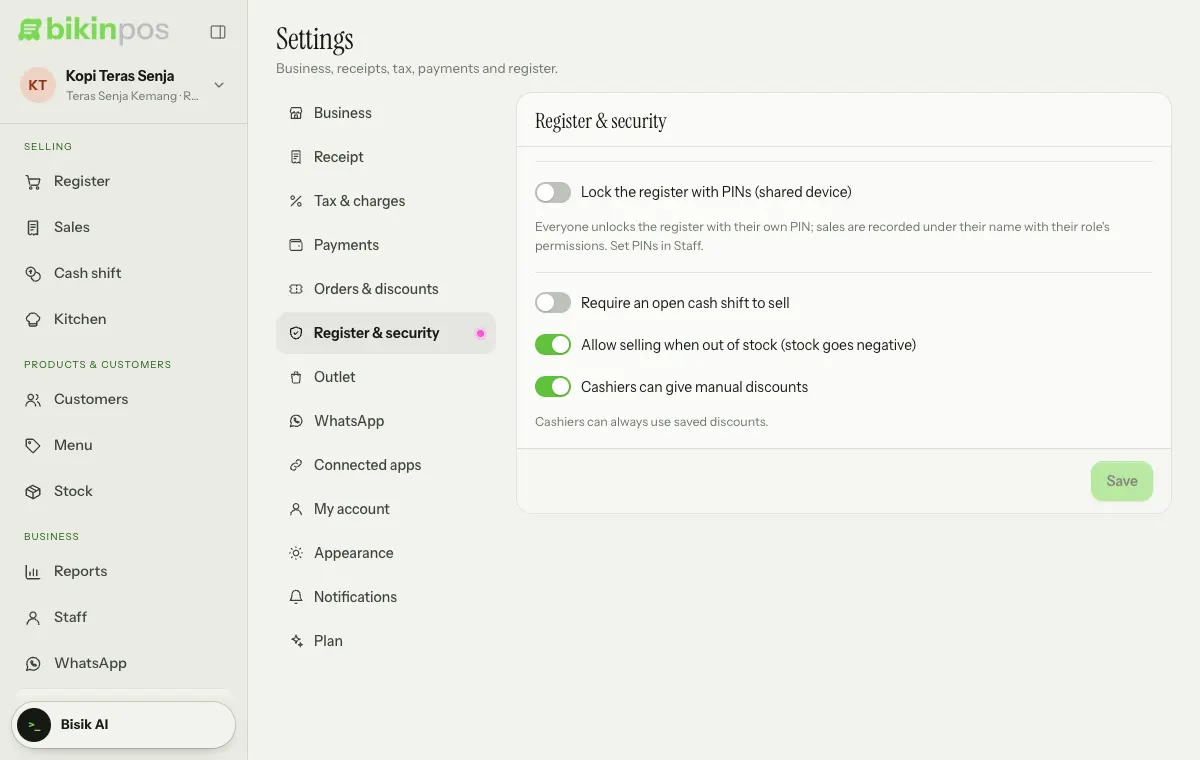
Yes. Give each person a PIN in Staff, then turn on Lock the register with PINs (shared device) in Settings › Register & security and press Save. To switch person, tap the business profile at the top of the sidebar, then Switch cashier / lock. See Outlets & staff.
Why is a menu missing?
Menus follow your role. Cashiers don't see Products, Stock, Reports and Staff. Kitchen only shows when the kitchen screen is on; if the kitchen screen isn't in your plan yet, the menu shows with a small lock. Other features your plan doesn't include also show locked rather than disappearing.
Why can't I sign in, with "Account paused" on screen?
The business's plan has ended and your account or outlet is over the free plan's limits. Ask the owner to renew the plan. Waiting sales stay on the device and send once the plan is active again.
"Session ended" appeared. What does it mean?
You've been signed out, because the session expired or the password changed. Press Sign in again. Waiting sales stay on the device.
How do I change the language?
Tap the business profile at the top of the sidebar, then choose Indonesia or English under Language. You can also do it in Settings › Appearance (Bahasa Indonesia or English).
Can sample data be removed?
Yes. Data marked Sample is removed in one tap from Quick start or Settings › My account › Getting started. Your own data isn't touched.
Last updated: