BIKIN FILEFeatures
Starred & Trash
Star the files you open often, move the ones you don't need to the Trash, restore them within 30 days, or delete them for good with a code from your email.
Starred
Star the files or folders you open often to find them fast in Starred. Choose ⋯, then Star, tap the star icon in the preview, or select several items, then Star. Stars are personal: everyone has their own Starred list. Choose Unstar to take a star off.
Moving to the Trash
Choose ⋯, then Move to Trash, or select several items, then Trash. The notice at the bottom of the screen has an Undo button in case you trashed the wrong thing. A trashed folder takes everything inside it along.
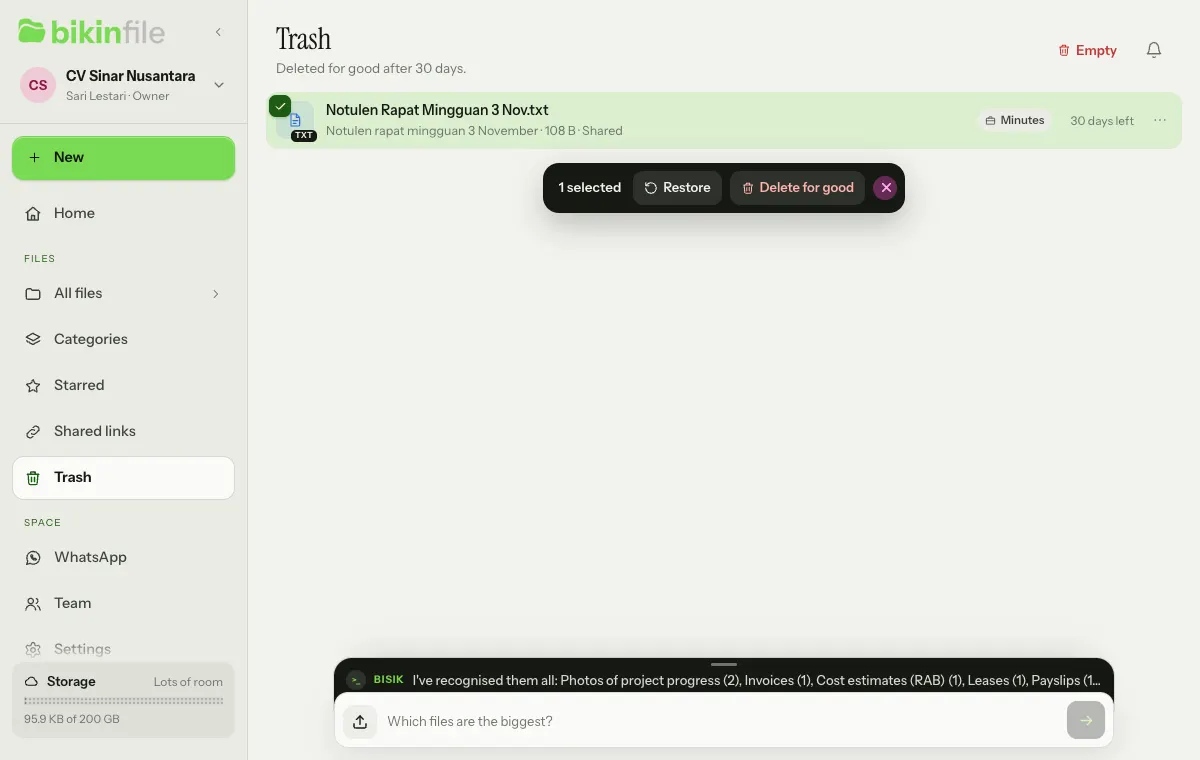
Files in the Trash:
- are kept for 30 days, with the days left on each row, then deleted for good automatically;
- can't be opened through a share link while they're in the Trash;
- still count towards your space's storage until they're deleted for good.
Restoring
Select items in the Trash, then choose Restore. They go back to their original folder. If that folder no longer exists or is in the Trash too, they go back to Shared or My files, wherever they came from. A restored folder brings back everything inside it. If the name is already taken, the item gets a number, such as "Report (2).pdf".
Delete for good and Empty
- Select items in the Trash, then choose Delete for good, to delete them now.
- Choose Empty at the top right to delete everything in the Trash that you may delete.
Both ask you to confirm and to enter a code from your email. The files and their contents are removed from storage, their share links and short links go too, and this can't be undone.
Who can do what
| Action | Owner and admins | Members | Viewers |
|---|---|---|---|
| Move Shared items to the Trash and restore them | Yes | Yes | No |
| Delete Shared items for good | Yes | No | No |
| Empty | The Shared Trash and their own My files | Their own My files | Their own My files |
| Every action on items in their own My files | Yes | Yes | Yes |
Deleting for good and emptying the Trash are recorded in the Team log, see Team & roles.
Last updated: