BIKIN FILEFeatures
Notifications
The bell, device push and email for storage that's almost full, archives that finished or failed to unpack, Read in more detail runs that finished or stopped, new files arriving through an upload link, document expiry reminders, signature requests and results, new files from WhatsApp and how capture stands, and new members signing in to the space.
The bell
The bell at the top right of every page (except Home) holds your notifications. Tap a notification to open its page, or choose Mark all read. The bell works on every plan.
| Notification | Who gets it |
|---|---|
| The space's storage is almost full or The space's storage is full | The owner and admins of the main space, once per level each month. Tap it to open Settings › Plan |
| Archive unpacked or Archive couldn't be unpacked | The person who unpacked a ZIP archive. Tap it to open the folder |
| Read in more detail finished, Read in more detail stopped, or Read in more detail stalled | The owner or admin who started Read in more detail. It says how many files were read again and how many weren't yet; stopped means Bisik kept the allowance for new files or today's safety limit ran out, stalled means the reading was cut off partway. Run Read in more detail again to continue; files already done are skipped. Tap it to open the folder or subcategory |
| New files arrived through an upload link | The person who turned on Allow uploads for that folder's link; if they are no longer active, the space's owner and admins. At most once per link per hour, naming only the folder, never the sender or the files; Bisik also writes one message listing the new files. Tap it to open the folder with only the files from that link |
| An upload link reached its limit | The same people, once the link has received as much as its limit. Raise the limit or choose Start a new count to accept files again. Tap it to open the folder |
| Expiry reminders, for example "Polis Asuransi Proyek Dago.pdf expires on 27 Nov 2026 (12 days left)" | The people the reminder is for: the file's owner for My files; for Shared files, the space's owners and admins plus the person who turned it on, or just that person. They arrive from 07.00 WIB at each stage, and files that look sensitive are written in general terms without the file name (see Document expiry dates). Tap it to open the Expiry dates page |
| Signature requests, such as "Sari Lestari asked for your signature", and their reminders, such as "Reminder: Sari Lestari is waiting for your signature" | The members asked to sign, when the request is sent and when the requester, or an owner or admin for Shared files, chooses Remind (at most once a day). Tap it to open the signing page (see Signatures) |
| Fully signed: … | The requester (if they're no longer active, the owners and admins of that space) and the members who signed, once the signed PDF is saved. Tap it to open the request's page |
| A signature request expired: … | The requester (if they're no longer active, the owners and admins of that space), when its date passes before everyone has signed |
| Couldn't finish the signed document: … | The requester and the members asked to sign, when the signed PDF fails to come together again and again. The request is cancelled, so ask for signatures again |
| New files from WhatsApp | The person who turned on file capture; if they're no longer active, the space owner. At most once an hour, "There are new files from WhatsApp in the WhatsApp folder.", without the sender's name or file names; Bisik also writes one message listing the new files. Tap it to open the folder (see Files from WhatsApp) |
| WhatsApp capture paused until tomorrow, WhatsApp capture paused, Storage full: WhatsApp files not saved or WhatsApp files went to My files | The same people, once a day per reason: the daily limit was reached, the person who turned capture on is no longer active or the plan no longer includes it, storage is full, or the target folder is now shared. Tap it to open Settings › WhatsApp |
| A notice about the space's WhatsApp number, such as when it disconnects or WhatsApp restricts it | The space's owners. Tap it to open Settings › WhatsApp |
| An image edit didn't finish | The person who asked for the edit, only when an edit with Bisik fails after more than two minutes; bell and push as you choose in Settings › Notifications (see Image editing) |
| A new member joined the space | The owner and admins of that space, when an invited member signs in for the first time. Tap it to open Team |
Storage warnings start with how much is used against your plan's capacity, such as "16.4 GB of 20 GB used.", then suggest what to do next: empty the Trash, delete files you don't need, or choose a roomier plan. When storage counts as full because an upload didn't fit, the sentence says why, such as "19.1 GB of 20 GB used, so the file just uploaded didn't fit." Their email and push carry the same words. What Bisik recognised and suggests after you upload doesn't go to the bell; it shows up in the Bisik conversation, above the chat box.
Choosing how you hear about things
In Settings › Notifications everyone chooses for themselves. The bell is always on; email and push can be turned on or off.
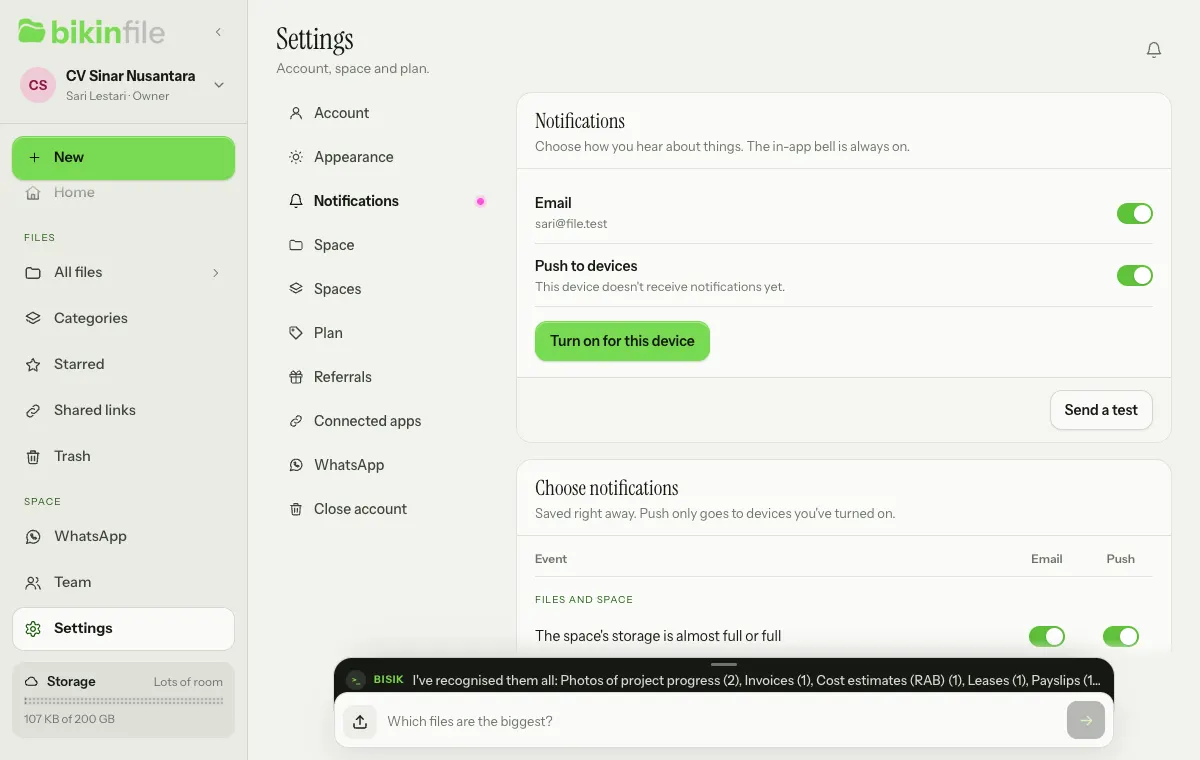
- Email goes to your account address. By default it's only on for The space's storage is almost full or full and, on plans that include the reminder summary email, Document expiry reminders (one summary email a day, not one email per document); you can turn on the other events yourself under Choose notifications.
- Push to devices: tap Turn on for this device, then allow it in the browser. Do this on every phone or computer that should receive notifications; Turn off on this device stops it. Once a device is on, push is on for every event. On iPhone, push only works once BIKIN FILE is on the home screen (Share › Add to Home Screen).
- Send a test sends one test notification to your active devices and to your email.
Under Choose notifications, the events are grouped into Files and space (The space's storage is almost full or full, An archive finished or failed to unpack, Read in more detail finished or stopped, New files arrived through an upload link, Signature requests and results, and New files from WhatsApp and capture status), Reminders & summaries (Document expiry reminders), and Team (A new member joined the space). You only get the notifications meant for your role.
Last updated: