BIKIN FILEFeatures
Document expiry dates
BIKIN FILE reminds you before vehicle registrations, insurance policies, contracts, leases, permits, certificates, passports and other documents expire. Bisik reads the date when it recognises a file, you turn the reminder on, and reminders arrive through the bell, push, Bisik and a summary email.
Many business documents have an expiry date: vehicle registrations (STNK) and roadworthiness tests (KIR), insurance policies, warranties, contracts and leases, business permits, certificates, and passports, driving licences (SIM), stay permits (KITAS) and police certificates (SKCK). BIKIN FILE reminds you before such a document expires, so there's still time to renew it.
Bisik mentions the date
When it recognises a document that has an expiry date, Bisik reads the date and mentions it in the message after the upload, for example "STNK Avanza.pdf is valid until 12 Jan 2027." Below it there's a Remind me 30 days before card. Press the card to turn the reminder on, or No thanks to skip it. When several documents are read at once, the card becomes Remind me about 3 documents with See list, where you can leave any document out first.
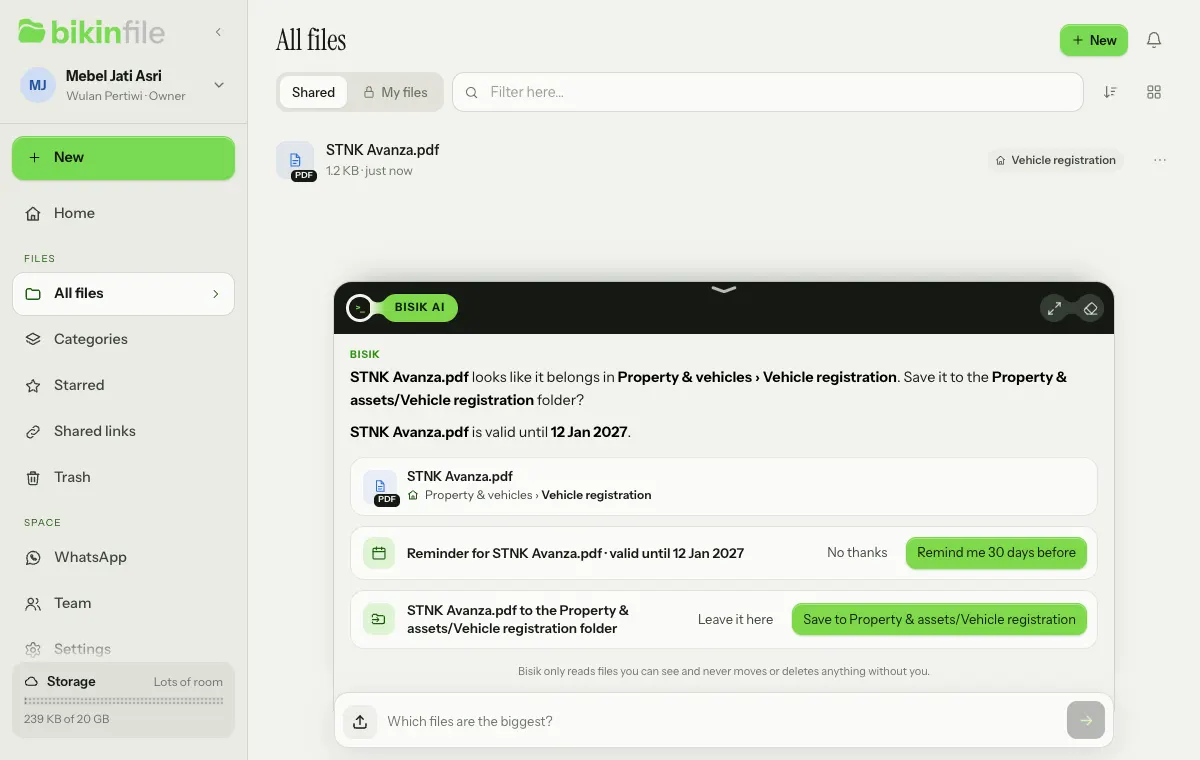
The default lead time follows the kind of document: 180 days for passports, because many countries ask for six months of validity left, 60 days for permits and contracts, and 30 days for everything else. You can change it at any time.
Dates read from documents can be wrong, so check them before relying on them. For ordinary documents, the date Bisik read also shows in the file preview as "Bisik read: valid until …" with Remind me and Not this date. For ID documents and other personal data, the date only appears on the Bisik card of the person who uploaded the file, and it's only saved when they press Remind me.
In the file preview
Open a document's preview to see the Valid until row: the date, how many days are left (for example "12 days left") and a status pill, Fine, Expires soon (30 days or less) or Expired.
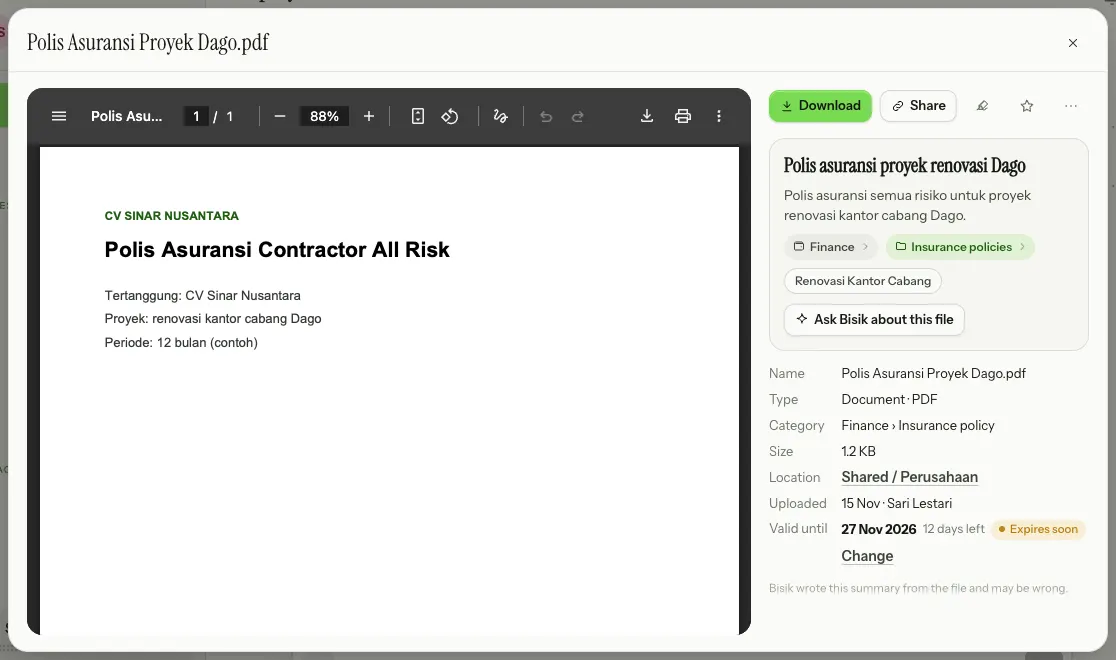
Choose Change to open the Change reminder sheet:
- Valid until: the date the document expires.
- Remind me: 7, 30, 60 or 180 days before.
- For (Shared files only): Space admins, meaning the space's owners and admins plus the person who turned the reminder on, or Just me. Reminders for files in My files are only for their owner.
- Turn off reminder to stop being reminded.
Files without a date show a small Add an expiry date link in their preview. Use it for older documents, such as passports, driving licences, KITAS, SKCK or employment contracts that were there before: those aren't read again automatically, so you fill in their date yourself.
Reminders can be set by the people who may change the file: owners, admins and members for Shared files, and the owner for files in My files. Viewers can only look.
The Expiry dates page
Every document with a reminder is on the Expiry dates page, which opens from the Expiry dates card on Home (choose See all), from the bell, or from Bisik. Choose Expiring soon, Expired or All above the list.
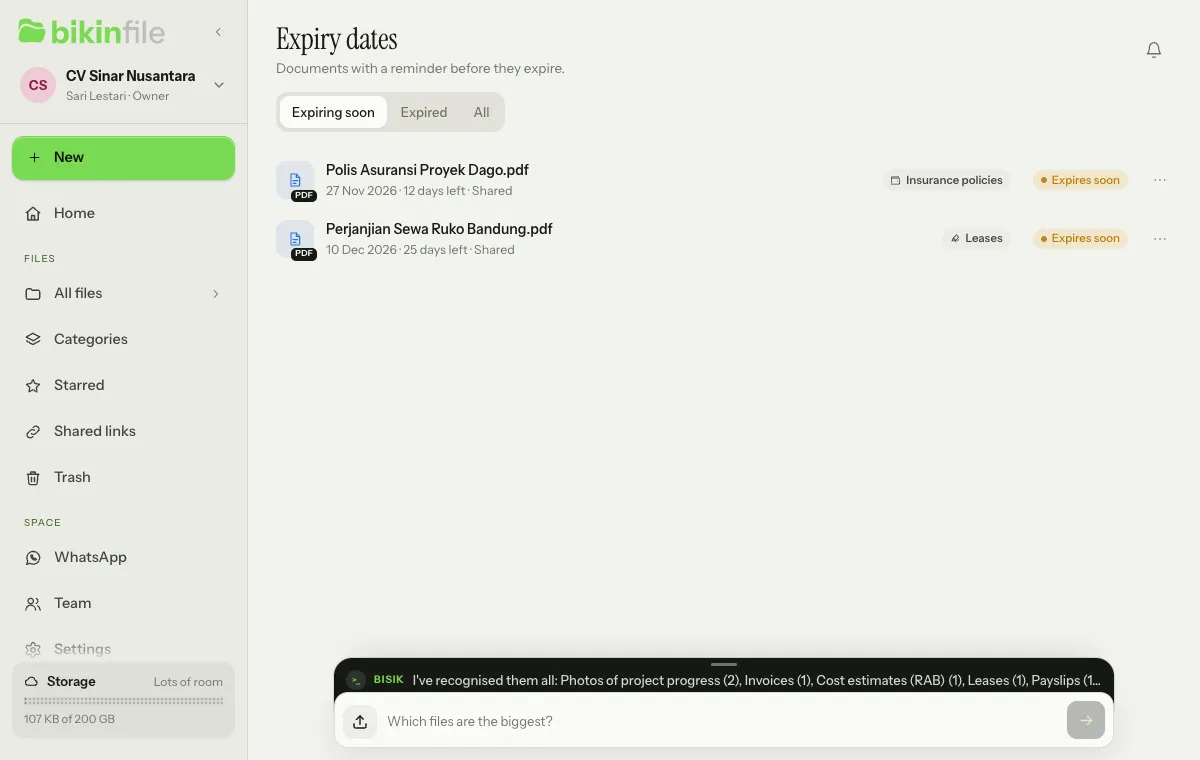
Each row shows the document's name, its expiry date, the days left, where it is (Shared or My files) and its status pill. Choose ⋯ to Open it or Change reminder. The Expiry dates card on Home only shows when a reminder is on, with the five nearest documents.
When reminders arrive
Reminders arrive from 07.00 WIB:
- when the lead time arrives (for example 30 days before), then 7 days before, on the day the document expires, and once more within a week after it if it wasn't renewed;
- through the bell and push to the devices you turned on, for example "STNK Avanza.pdf expires on 12 Jan 2027 (30 days left)";
- through one Bisik message on a day with new reminders, for example "2 documents expire soon.", with the file cards;
- through one daily summary email on plans that include it, when you turn it on in Settings › Notifications (see Notifications).
For files that look sensitive, the bell, push and email are written in general terms without the file name, for example "An identity document in My files expires on 3 Mar 2027". The file name only shows in the app.
You can also ask Bisik, for example "which documents expire soon?". Bisik answers with file cards, only from documents you may see.
Updating a renewed document
Once a document is renewed, upload the new one: Bisik reads the new date and offers a reminder again. For the old document, open its preview and change Valid until in Change, or choose Turn off reminder if it's no longer used. A reminder is removed along with its file when the file is deleted for good.
Last updated: