BIKIN WARUNGFeatures
Working offline
BIKIN WARUNG keeps working when the signal drops. Scanning, paying and printing receipts carry on; sales are kept on the device and sent by themselves once you're back online, never twice.
Like Bikin POS, BIKIN WARUNG keeps working when the signal drops. Install BIKIN WARUNG on your home screen and open it at least once while online, so the pages, your shop's items and the shared item database are saved on the device.
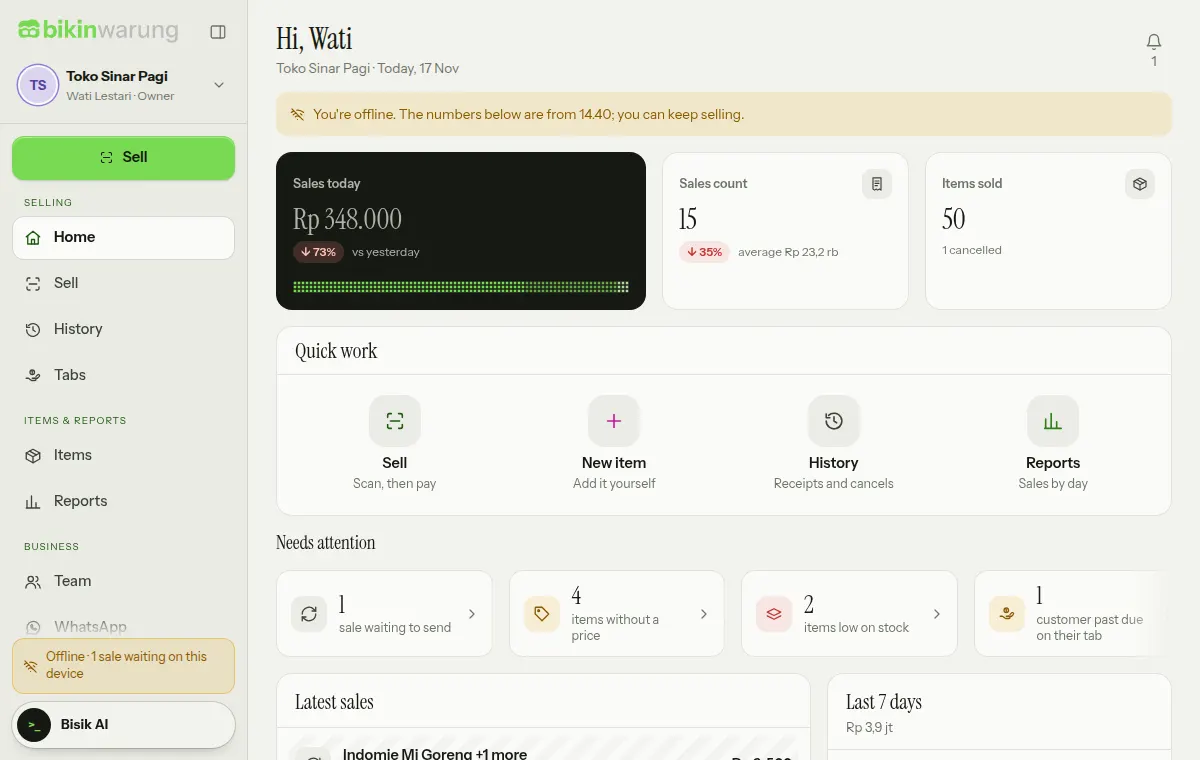
What still works
- Opening the app. Home shows the last numbers saved on the device, with the time they're from.
- Scanning and searching items. Your shop's items and the shared item database are searched on the device, so scan results still show up without waiting for the network.
- Selling with Cash, QRIS or Transfer. The screen after payment says Saved on this device, and the receipt can still be printed on a Bluetooth printer. For QRIS, the Pay screen uses your shop's own QRIS image.
- Sending receipts through WhatsApp on this device: the WhatsApp button on a receipt opens WhatsApp on the device with the same message.
- The cart and carts on hold, because both are kept on the device anyway.
Sent by themselves
Offline sales go into a queue on the device and show as waiting to send. The queue sends itself once you're back online, when the app opens, and every so often. Every sale gets its own ID when it's made, so sending it again never creates a duplicate.
The bottom of the sidebar shows what's going on, such as Offline · you can keep selling, how many sales are waiting on the device, or how many were rejected. Tap it to open Sales on this device, then choose Send now. Sales the server rejected stay there with the reason and can be removed with Discard.
What needs the internet
- Tabs: on the Pay screen the Tab option is locked, and tab sales never go into the device queue.
- Automatic QRIS: a new QR can't be made offline. A QR already on screen stays there, and its payment is checked again once you're back online. See Automatic QRIS.
- Receipts and reminders sent straight from your business WhatsApp number. See WhatsApp.
- Bisik and Scan AI.
- History, Tabs, Reports and Settings.
- Saving stock in and importing items. A stock-in draft stays on the device until you're back online.
One device, several people
Every queued sale carries the name of the person who made it, and is only sent while that person is signed in. Other people's sales wait until they sign in again, so a shared device never sends someone's sales under someone else's name.
Signing out of BIKIN WARUNG removes the queue, the cart, carts on hold, the saved data and the stored pages from that device. If some sales haven't been sent yet, BIKIN WARUNG asks first; wait until you're back online so they get sent.
Last updated: