BIKIN WARUNGGet started
Home
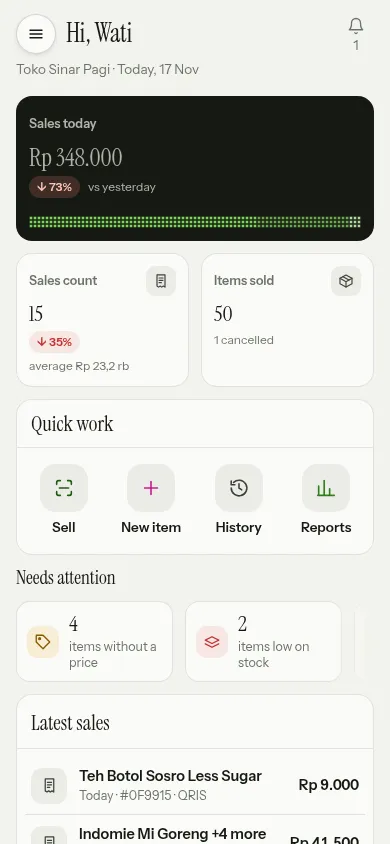
BIKIN WARUNG Home is where you work: today's sales against yesterday, Quick work, things that need attention, the latest sales and a 7-day chart.
Home is where you work, not a long report. As soon as it opens you know how much has sold today, what needs sorting out, and you can start selling straight away. Fuller analysis lives in Reports.
Today's numbers
- Sales today: the total of every sale today, with the change against yesterday. Tap the card to open History.
- Sales count: how many sales there were today and the average per sale.
- Items sold: how many items went out today, with the number of cancelled sales.
Cashiers see Your sales today, which is their own sales. Cashiers only see every cashier's total if the owner switches on Cashiers may see today's total sales of every cashier in Settings › Business.
Quick work
The Quick work card holds the shortcuts used most: Sell (scan, then pay), New item (add it yourself), History (receipts and cancels) and Reports (sales by day). What shows depends on your role: without access to Reports, the fourth button becomes Items (prices and stock).
Needs attention
The Needs attention tiles show things you can sort out right away. Tap a tile to open its page:
- sales waiting to send: offline sales that haven't reached the server yet. See Working offline.
- items without a price: quick buttons or other items that don't have a selling price yet.
- items low on stock: items below their minimum stock, when stock is tracked.
- customers past due on their tab: customers whose tab is still unpaid after the due date. See Customer tabs.
Tiles at zero aren't shown.
Latest sales and the last 7 days
Latest sales lists the newest sales with their time, receipt number and payment method; choose See all to open History. Sales still waiting to be sent are marked waiting to send.
Last 7 days shows sales per day as dot columns. Touch a column to see the date, the amount and the number of sales, then choose Open Reports for the details.
The bell
The bell at the top right holds your notifications: yesterday's sales summary every morning, items running low, cancelled sales, and for owners, withdrawals BIKIN has processed and sending to BIKIN KAS that stopped or is on hold. Choose Mark all read to clear what's new. How you get notified by email or on your device is set in Settings.
When you're offline
Without internet, Home shows the last numbers saved on the device with the time they're from, and you can keep selling. See Working offline.
Last updated: