BIKIN WARUNGFeatures
Send to BIKIN KAS
Connect BIKIN WARUNG to a cashbook in BIKIN KAS, and daily sales arrive by themselves as money in, one record per payment method, with no customer names or items.
Keep a cashbook in BIKIN KAS? Connect BIKIN WARUNG to one of its pockets. Every morning, yesterday's sales arrive in BIKIN KAS as money in, one record per payment method, for example "WARUNG sales 17 Nov (cash) · 42 sales". Your shop's takings never need recording twice.
Send to BIKIN KAS is on every plan, and only the business owner can connect it.
What's sent
- Paid sales after discounts, tab down payments and tab payments, added up per payment method: cash, QRIS and transfer. Tab down payments count as cash.
- Unpaid tabs and cancelled sales aren't included.
- Only amounts and the number of sales. Customer names, items and cashiers never leave BIKIN WARUNG.
- Never doubled, and a record you delete in BIKIN KAS isn't created again.
- Each day is sent once. Later cancellations, and sales from a phone that was offline that only arrive after that day's summary was sent, don't change the summary; adjust it yourself in BIKIN KAS if needed.
Days that were missed, for example while BIKIN KAS was on hold, are sent later, going back at most seven days and never before the day you connected.
Connecting
- Make sure the email of your BIKIN WARUNG account is also an owner or admin of a business in BIKIN KAS, and that you've signed in to BIKIN KAS with that email at least once.
- Open Settings › Connected apps. The Send to BIKIN KAS card is at the top.
- Choose the BIKIN KAS business. The list names each business's owner, for example "Toko Sinar Pagi · owner Wati Lestari", and nothing is chosen for you. Then choose the pocket under Into pocket, for example the cash pocket.
- Choose Connect, then enter the code from your email.
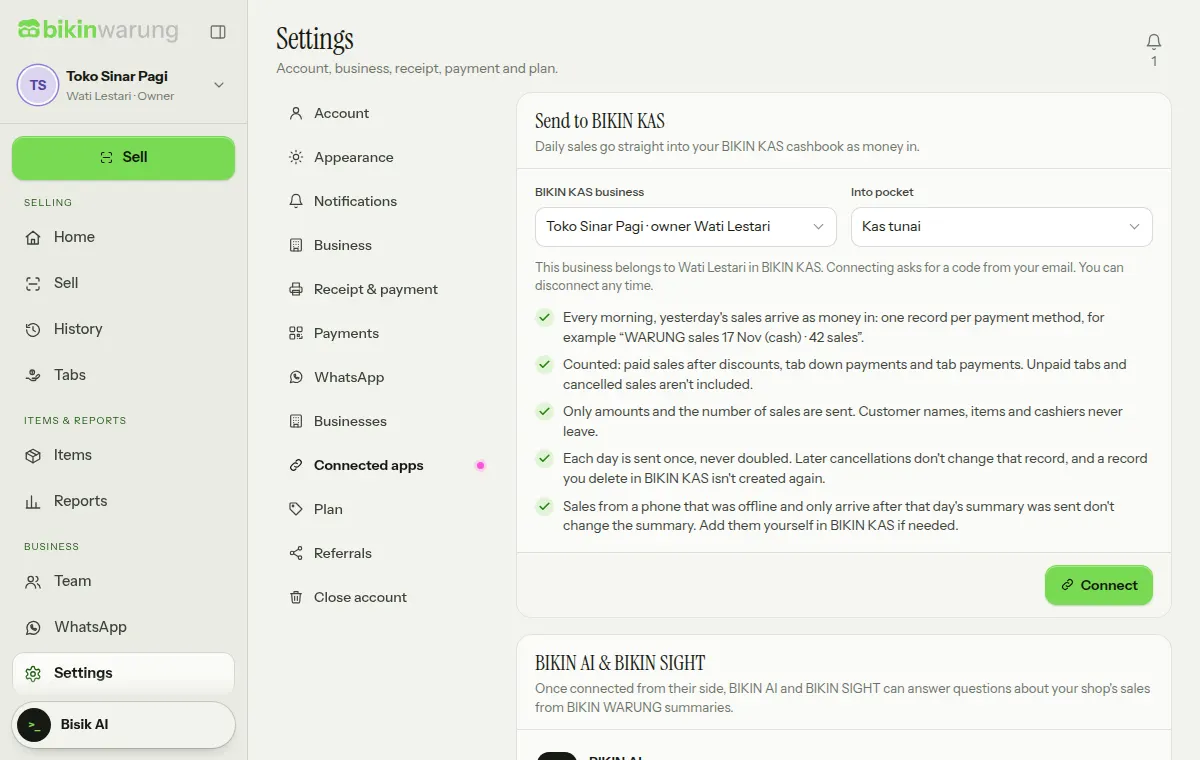
The first summary arrives the next morning. If this shop was connected to BIKIN KAS before, days not sent yet follow by themselves, and the message after Connect says so. The business in BIKIN KAS must use the same currency as BIKIN WARUNG; if it doesn't, the card asks you to make them the same first. A BIKIN KAS business with no pocket yet is flagged on the card too: add a pocket first under Pockets in BIKIN KAS.
No BIKIN KAS yet?
If there's no BIKIN KAS business with your email, or you haven't signed in to BIKIN KAS with that email yet, the card says No BIKIN KAS yet? with three steps: Sign up free, Use the same email, then Come back and connect. Try BIKIN KAS opens the BIKIN KAS page in a new tab. Once you've signed up, come back to the BIKIN WARUNG tab; the list of businesses reloads by itself, or choose Check again.
Connection states
Once connected, the card shows the BIKIN KAS business, Into pocket, Since and Last sent, with a state badge:
- Active: a summary is sent every morning.
- On hold: BIKIN KAS can't take records right now, for example because the BIKIN KAS plan's records for this month are used up. Sending is retried every hour, and missed days follow.
- Stopped: the connection no longer works, for example because you're no longer an owner or admin of that BIKIN KAS business, the pocket was archived, the business was closed or the currencies differ. The card says why; choose Connect again or Remove connection.
The bell tells the owner when sending stops or is on hold. Days locked in BIKIN KAS with Lock records are skipped, also with one notification.
Changing or disconnecting
- Change pocket: pick another pocket, or another BIKIN KAS business, then Save. Moving to another business brings along the days not sent yet, going back at most seven days; what already arrived in the old business isn't sent again.
- Disconnect: sales stop being sent. Records that already arrived stay in BIKIN KAS. If you connect again, the days not sent yet (going back at most seven days) follow without re-sending what already arrived.
Demo accounts can't be connected to BIKIN KAS.
Last updated: