BIKIN KASFeatures
Connect your business WhatsApp number, record money in, money out and debts from the chat with yourself, and send debt reminders and payment receipts to registered contacts.
BIKIN KAS uses your own business WhatsApp number, connected like WhatsApp Web. The WhatsApp menu in the sidebar is always there for owners, admins and bookkeepers, even before the number is connected or your plan includes it.
Connecting the number
Only the owner connects the number, with a code from their email:
- Open Settings › WhatsApp and choose Connect a number on the Your business WhatsApp card.
- Read Before you connect, then choose Show the QR.
- On the business phone, open WhatsApp › Linked devices › Link a device and scan the QR. Without a camera, choose Use a code and type the code into the phone.
The Your business WhatsApp card then shows the status, the number and since when it's connected. Use the business number, not a personal one; the phone with that number must stay on and online. The same number can also be used in other BIKIN apps. Connecting a business WhatsApp number is on paid plans.
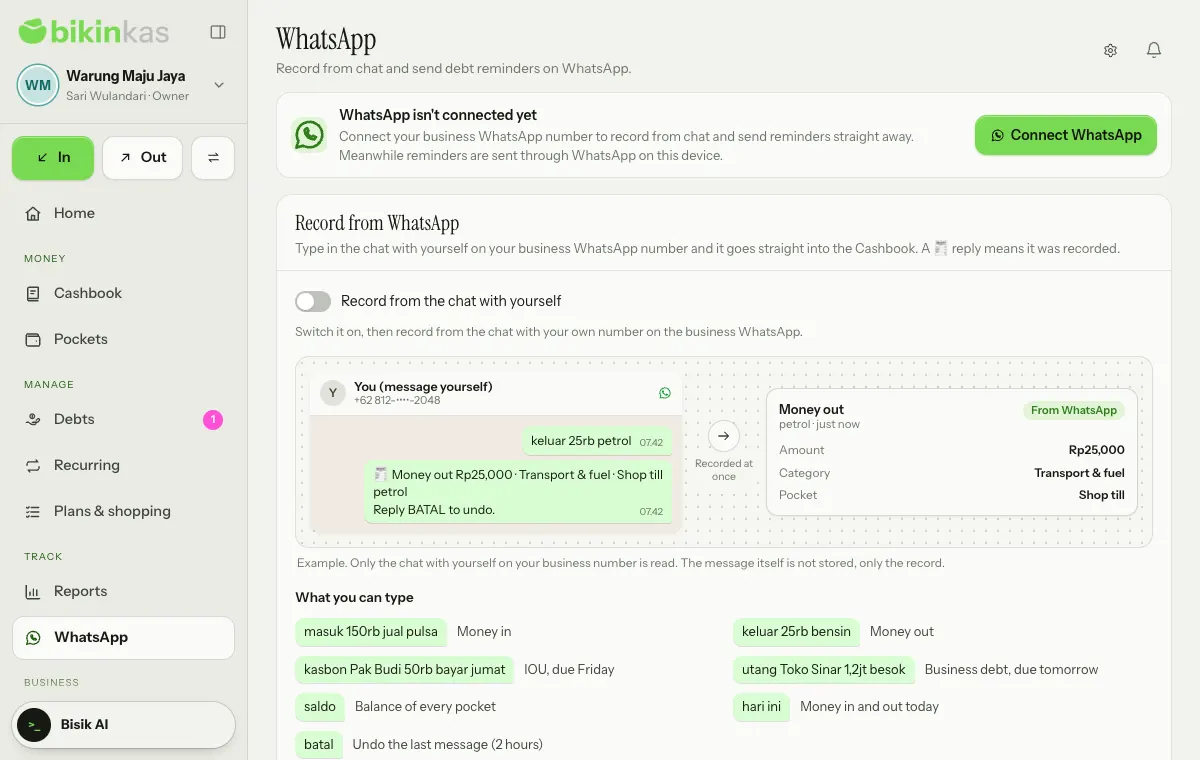
Until the number is connected, the WhatsApp page reads WhatsApp isn't connected yet, and the owner sees a Connect WhatsApp button. If your plan doesn't include it yet, the line reads WhatsApp isn't part of your plan and the owner sees See plans.
Record from WhatsApp
The chat with yourself on the business WhatsApp number can work as a notebook. Type, for example, keluar 25rb bensin, and the record goes straight into the Cashbook in the owner's name, with the source From WhatsApp. A reply starting with 🧾 means it was recorded.
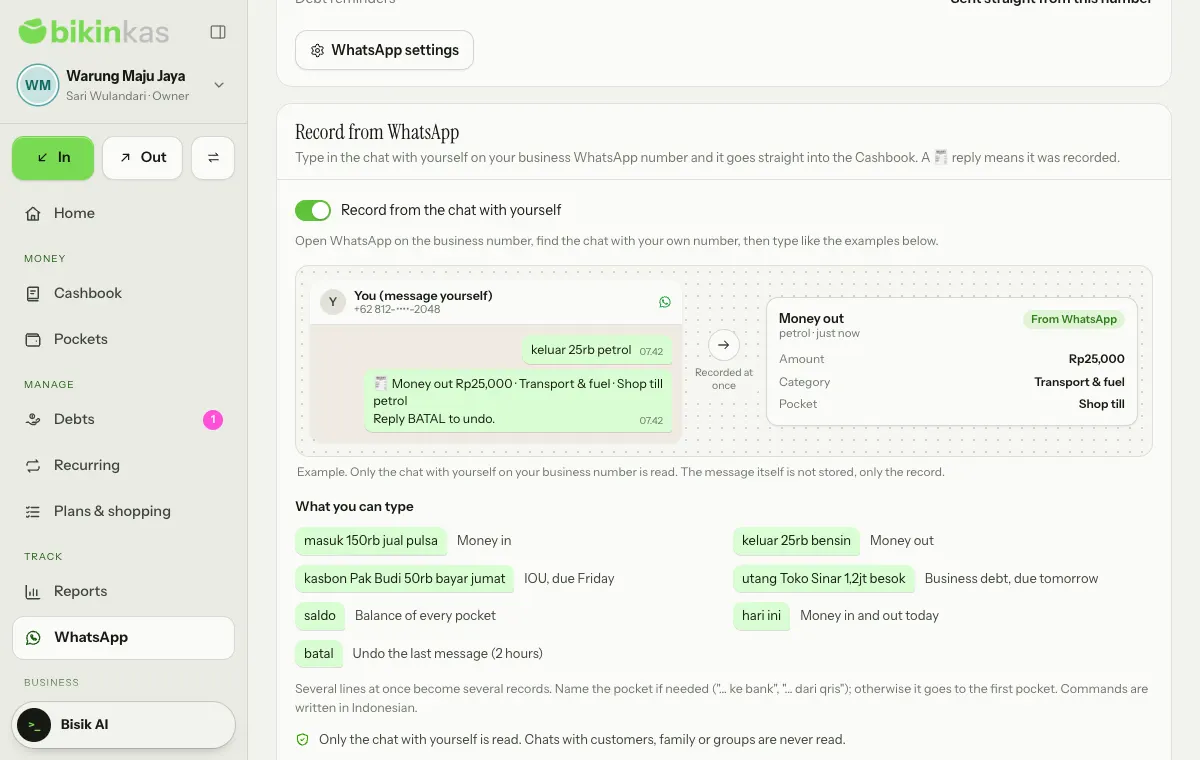
- The owner switches on Record from the chat with yourself on the WhatsApp page or in Settings › WhatsApp. It's on paid plans; other roles only see whether it's on. It's also only for businesses that use Indonesian rupiah (IDR), because messages are read with rupiah words and amounts such as 25rb or 1,5jt.
- Open WhatsApp on the business phone, find the chat with your own number, and type a command.
| Type | What it does |
|---|---|
masuk 150rb jual pulsa | Money in |
keluar 25rb bensin | Money out |
kasbon Pak Budi 50rb bayar jumat | IOU, due Friday |
utang Toko Sinar 1,2jt besok | Business debt, due tomorrow |
saldo | Balance of every pocket |
hari ini | Money in and out today |
batal | Undo the last message (2 hours) |
- Several lines at once become several records, at most 10 lines per message; either all of them are recorded, or none when one can't be read.
- Name the pocket when needed, such as "… ke bank" or "… dari qris"; otherwise it goes to the first pocket. The category is suggested from the words in the note.
- Write amounts the usual way: 25rb, 1,2jt or 150.000. Due dates can be besok (tomorrow), lusa (the day after), a day name, minggu depan (next week), bulan depan (next month), or a date such as 20/11.
- Typo? Reply
batalwithin 2 hours to undo every record from the last message, or edit and delete the records in the Cashbook. - Type
bantuanto see examples. Ordinary chat that isn't a money record gets no reply.
Only the chat with yourself is read. Chats with customers, family or groups are never read. The message itself isn't stored; only the record is, just like recording in the app. Plan limits and record locks still apply.
Debt reminders
For money owed to you, Remind in a debt's details sends one message with a fixed text: Polite, Short or With details. See Debts. The Debts you can remind card on the WhatsApp page lists unpaid debts; tap a name to open the debt, then choose Remind.
- Messages only go to contacts whose number you saved under Debts › Contacts. Other numbers are never messaged.
- One message per tap, at most once a day per debt. No bulk messages.
- Replies aren't stored in BIKIN KAS; answer them from WhatsApp on your phone.
- With the business number connected, messages go out straight away through a queue that protects your number from blocks. Without it, Open WhatsApp opens WhatsApp on this device with the same text.
In Settings › Business, on the Reminders card, the switch Offer "Send a WhatsApp reminder?" in the bell when a debt is due makes the bell offer a reminder when a debt falls due. BIKIN KAS never sends reminders to other people by itself; you tap Remind.
Payment receipts
After Receive payment on a debt, the Send receipt button in the notice opens the Send a receipt sheet: a thank-you, the amount paid, the date, and what is left or that it's fully paid. One receipt per payment. A receipt for the last payment can also be sent from ⋯ › Send a receipt for the last payment in the debt's details.
When the debt's details are shared with a link, the link is added as the last line of reminders and receipts, so the person can see their payment history themselves.
Who can do what
| Role | |
|---|---|
| Owner | Connects the number, switches on Record from WhatsApp, sends reminders and receipts |
| Admin and bookkeeper | Send reminders and receipts, see the connection status |
| Cashier and viewer | Don't see the WhatsApp menu |
Demo accounts never connect a number or send messages.
Last updated: