BIKIN KASGet started
Home
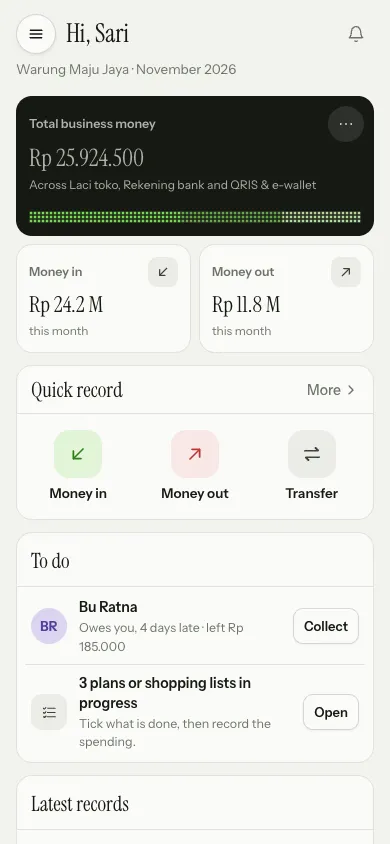
BIKIN KAS Home is where you work: total money with a shortcut menu, Quick record, things to do, the latest records, and money in and out over the last 7 days.
Home is made for working, not for analysing: key numbers, record buttons, jobs you can finish right away, the latest records and one simple chart. Breakdowns by category, pocket and period live in Reports. The order is the same on phones and computers.
Key numbers
- Total business money adds up every pocket you may see, with a dotted bar showing each pocket's share. Its title follows your kind of business, such as My total money for personal use or Total funds for a community. Tap the card to open Pockets.
- This month's Money in and Money out, compared with the same dates last month. Tap one to open the Cashbook on the matching tab.
The total card has a ⋯ menu with shortcuts: Pocket balances, Move between pockets, Cashbook, This month's report and Hide amounts. Hide amounts replaces the total, money in and money out with dots, so nobody reads your balance while the phone is used in the shop. The choice is remembered per device; choose Show amounts to bring them back.
Quick record
The Quick record card holds the three main actions: Money in, Money out and Transfer between pockets. Tap one to open the record sheet. More in the card's header opens More ways to record:
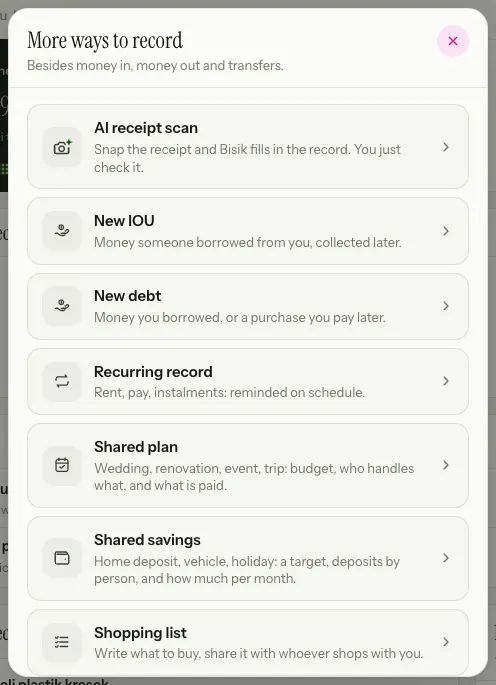
- AI receipt scan: take or pick a receipt photo; the record sheet opens and Bisik fills it in. Needs the internet.
- New IOU and New debt: see Debts.
- Recurring record: rent, wages and instalments, reminded on schedule.
- Shared plan, Shared savings and Shopping list: see Plans & shopping.
- Check a balance: match a balance with the money that's really there.
Cashiers only see Money in and Money out, and viewers don't see this card.
To do
The To do card lists things you can finish straight from Home. Anything empty isn't shown.
- Recurring records that are due, with a Record button that opens a filled-in record sheet.
- Debts that are due, oldest first, with Collect or Pay to open them.
- Pockets not checked for more than 30 days, with Check.
- Plans and shopping lists still in progress, with Open.
When more debts are due, All debts at the foot of the card opens the full list.
Latest records and the last 7 days
Latest records shows the newest records; records not yet sent from this device come first, on a striped background. See all opens the Cashbook.
Last 7 days shows money in and out per day as dotted columns; tap a day to see its numbers. Below it is one line, Most spent this month, and Open Reports takes you to Reports.
Home for cashiers
Cashiers see Money in today, Money out today, the Quick record card and Your records today. Total money and reports aren't shown. Balances of the pockets opened for them only show when the owner allows it in Settings › Business (the Balances for cashiers card).
Offline, Home shows the last numbers saved on the device with the time they're from. See Working offline.
Last updated: