BIKIN KASAccount & plan
Settings
Account, appearance, notifications and reminders, business details, currency, record locks, balances for cashiers, categories with suggestion keywords, WhatsApp, and connected BIKIN apps.
The Settings menu is split into sections, and which ones you see follows your role. Everyone sees Account, Appearance, Notifications and Plan. Owners and admins also see Business, Categories and Connected apps; owners, admins and bookkeepers see WhatsApp. Plan, Businesses, Referrals and Close account are covered in Plan & account.
Account and appearance
- Account: Profile photo, My account (your name), Password, Google account when Sign in with Google is available, and Getting started to replay the welcome, Quick start and tips. Changing your password signs you out on other devices.
- Appearance: the Light or Dark theme (it follows your device by default), the language Indonesia or English, and Install the app so BIKIN KAS opens from your home screen like a normal app.
Business
The Business section (owners and admins) holds:
- Photo & banner, shown on the link pages you share, such as shopping lists.
- The Business card: Business or cashbook name, Used for (the kind of business, which sets the wording and category suggestions; existing data stays as it is), Time zone (WIB, WITA or WIT), and the city, phone, email and address.
- The Currency, Lock records, Reminders and Balances for cashiers cards.
Currency
The Currency card sets the currency for every amount in this business, from records and pocket balances to debts, reports and the links you share. Thousand and decimal separators follow that currency, such as Rp 1.250.000 for Indonesian rupiah and RM 1,250.50 for Malaysian ringgit, and amount fields add the thousand separators as you type. A new business gets the currency of the country it signs up from, and extra businesses in a group follow the main business.
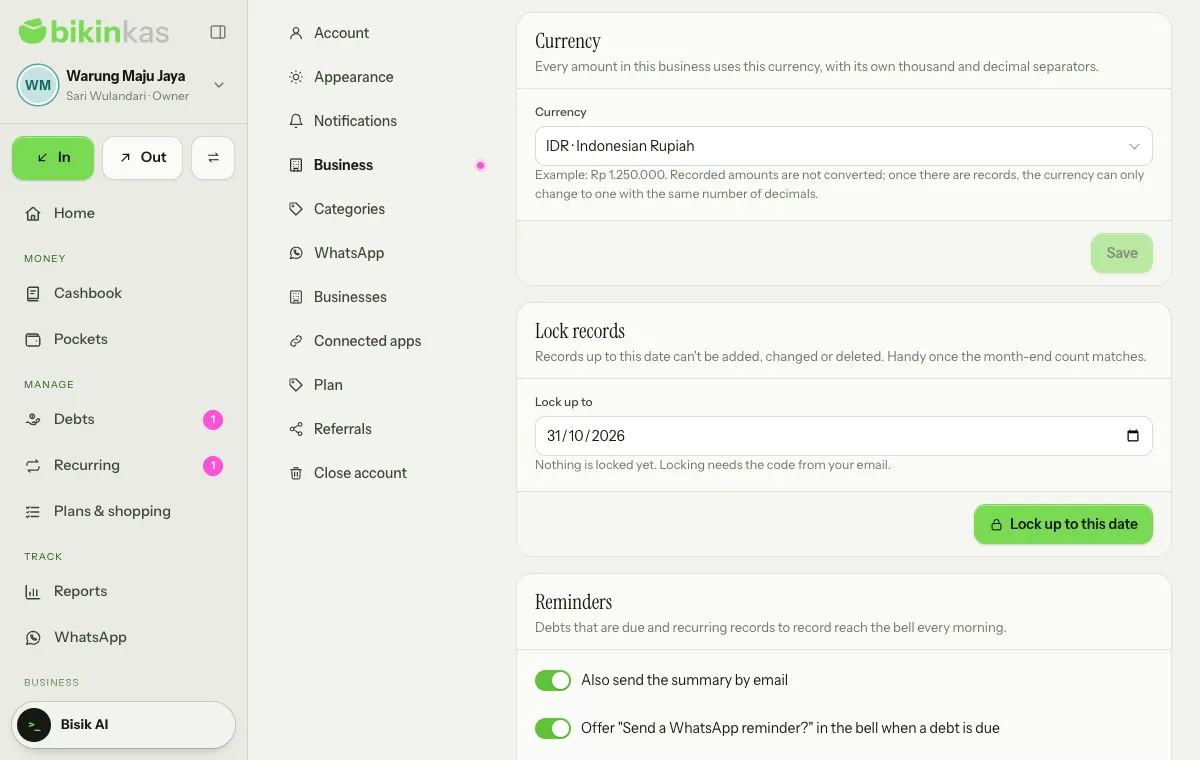
- Only the owner changes it: pick a currency in the list (type in the search box to find it), then Save. Admins see the card with Only the owner changes it.
- Until the business has money records, you can change the currency freely. After that it can only change to a currency with the same number of decimals, because recorded amounts are never converted.
- Record from WhatsApp is only for businesses that use Indonesian rupiah (IDR). With another currency its card stays visible but locked, marked Only for businesses that use Indonesian rupiah (IDR), and moving away from rupiah switches it off.
- BIKIN KAS plan prices, bills and referral commission stay in rupiah.
Lock records
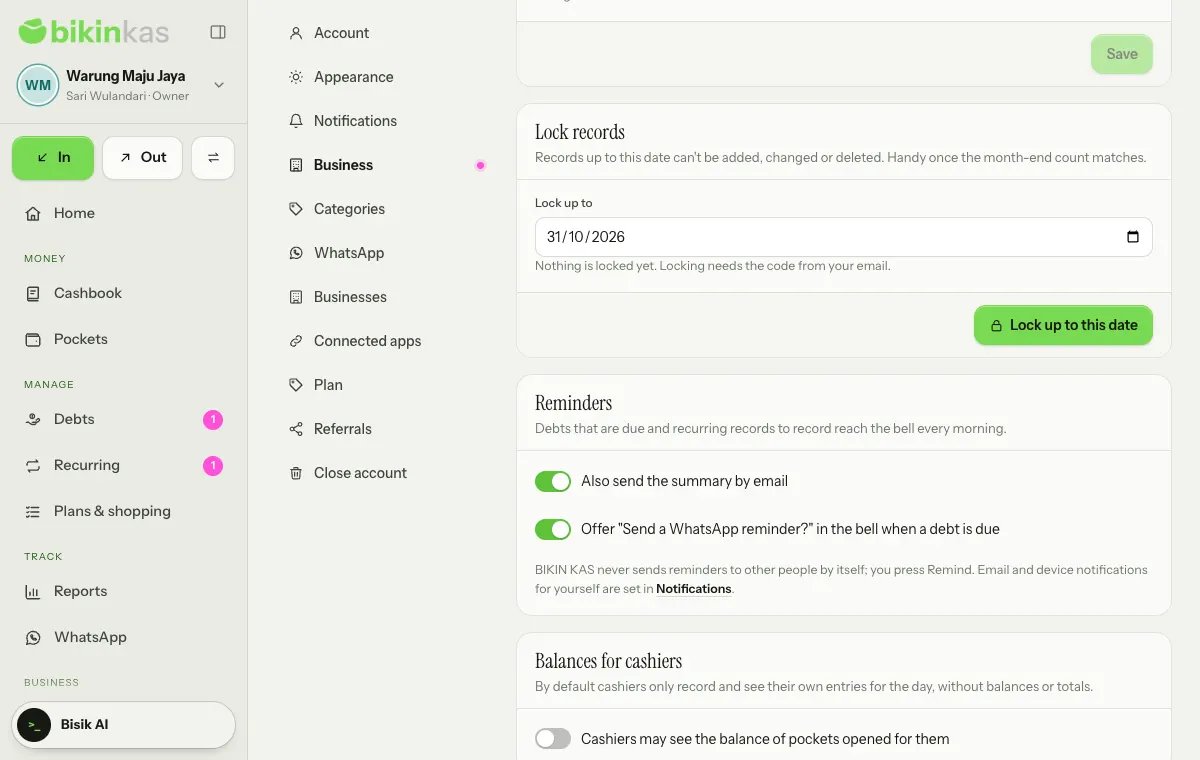
Once the month-end count matches, lock the records so they don't change again. Fill in Lock up to, then choose Lock up to this date. Records dated up to that day can't be added, changed or deleted by anyone until an owner or admin chooses Unlock. Locking and unlocking ask for a code from your email and are logged. Locking records is on plans with the Lock records feature.
Balances for cashiers
By default cashiers only record and see their own entries for the day, without balances or totals. The owner can switch on Cashiers may see the balance of pockets opened for them.
Notifications and reminders
The bell at the top right of every page holds your notifications. Tap one to open its place, or Mark all read.
Every morning from 07.00 WIB, BIKIN KAS checks for debts falling due (the day before, on the day, then when late) and recurring records that are due. Reminders reach the bell of owners, admins and bookkeepers, once per item per day.
The Reminders card in the Business section has two switches:
- Also send the summary by email: one email summary a day, on plans with the Email reminder digest feature. It only goes to people who switched on email for the daily reminders in the Notifications section.
- Offer "Send a WhatsApp reminder?" in the bell when a debt is due: the bell offers a reminder, and you tap Remind. BIKIN KAS never sends reminders to other people by itself.
In the Notifications section, everyone picks how they hear about things. Email goes to your account's address. For Push to devices, choose Turn on for this device and allow it in the browser; on iPhone, push only works once BIKIN KAS is installed on the home screen. Choose notifications sets email and push per event: A difference found in a balance check, A shopping list was changed through its link and Daily reminders: debts and recurring records. Send a test sends one test notification.
Categories
The Categories section (owners and admins) holds the Money out and Money in categories.
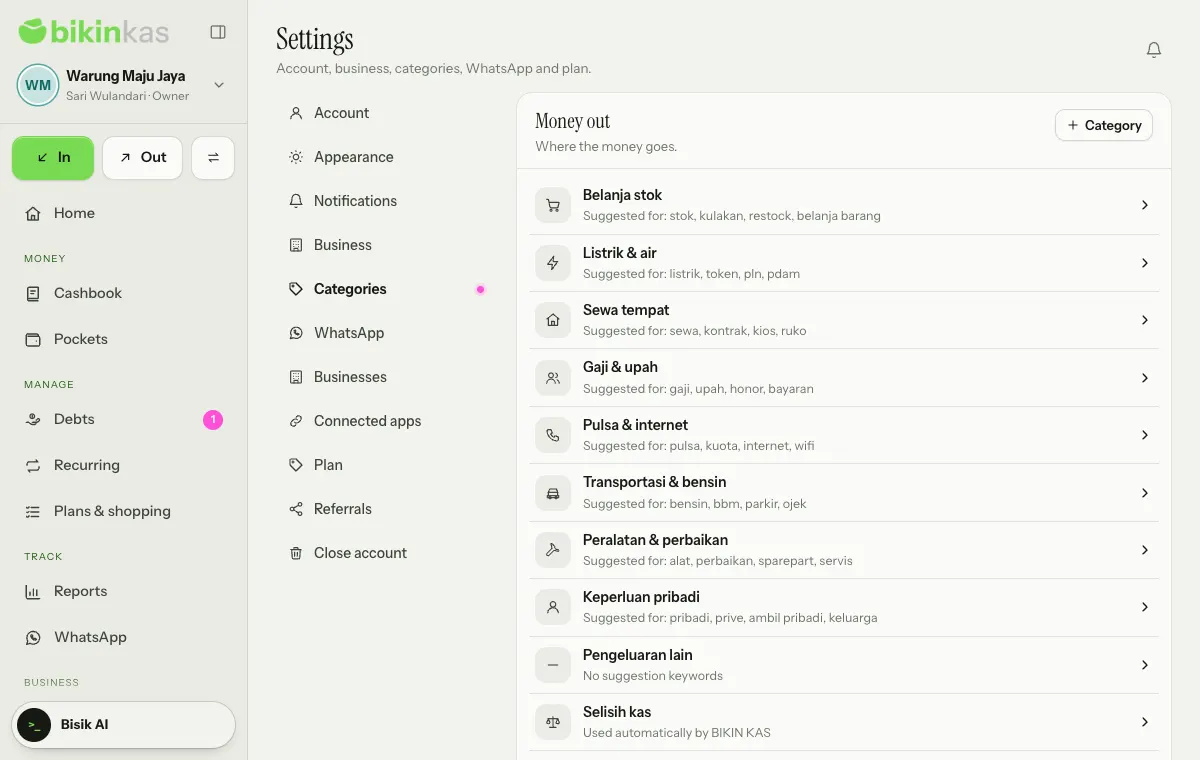
- Choose Category on a card to add one. Fill in the Category name, pick an Icon, and add Suggestion keywords (optional), separated by commas. When one of those words is in a note, this category is suggested in the record sheet straight away.
- Tap a category to edit it. Switch off Offered when recording to hide it from the record sheet without deleting it.
- A category already used by records isn't deleted, only archived, so old records keep their category.
- Cash difference, Debts & loans and Admin fees are used automatically by BIKIN KAS for balance check adjustments, debt payments and transfer fees. Only their name and icon can be changed.
The WhatsApp section holds the Your business WhatsApp card for connecting the business number (owner), the Record from WhatsApp card, and how debt reminders work. See WhatsApp.
Connected apps
Connected apps (owners and admins) lets BIKIN AI and BIKIN SIGHT read summaries of your cashbook: pocket balances, money in and out by period and category, the latest records, unpaid debts and recurring records. A connection only reads; it never records, changes, deletes, pays or sends anything. Free-text notes, contacts' phone numbers, proof photos, shopping lists and the business address never leave through a connection.
A connection starts from the app that wants to read the data: open BIKIN AI (Settings › Connectors) or BIKIN SIGHT, pick BIKIN KAS, sign in if needed, then choose Allow on the Connect page. What it reads follows the role of the person who allowed it. In BIKIN KAS, each connection shows who connected it and when it was last used, with a Disconnect button. It's on plans with the BIKIN AI and SIGHT connector.
Last updated: