BIKIN KASFeatures
Reports
Money in, money out and what's left for a period, in everyday words: Summary, Categories, Pockets and Debts, with CSV export and printing.
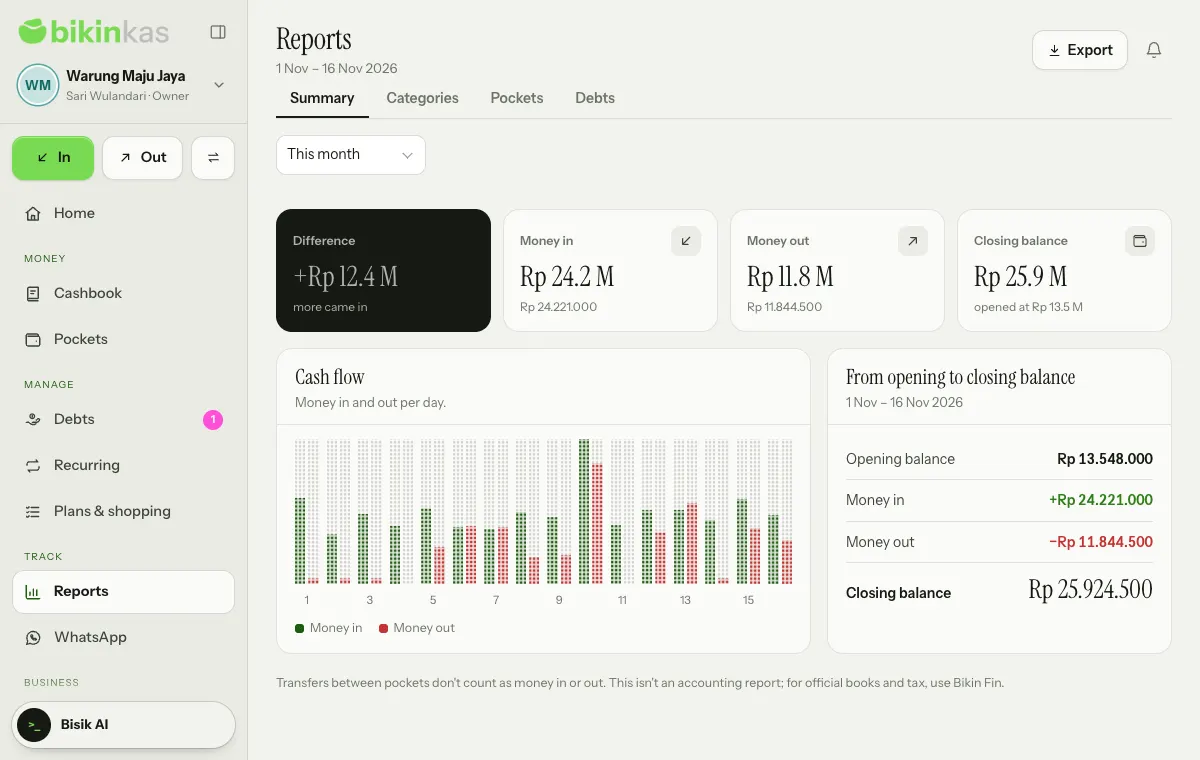
The Reports menu answers how much came in, where it went and what's left for one period. These aren't accounting reports; for formal bookkeeping and tax, use Bikin Fin.
Pick the period in the page header: Today, Last 7 days, This month, Last month, Last 3 months, This year or Pick dates.
Report tabs
| Tab | What's inside |
|---|---|
| Summary | Difference, Money in, Money out and Closing balance, the Cash flow chart (per day up to 62 days, per month beyond that), and the From opening to closing balance sum |
| Categories | Money out by category and Money in by category, with percentages |
| Pockets | Where the money was at period end and the Movements by pocket table: opening balance, in, out, transfers and closing balance |
| Debts | Unpaid debts to receive and to pay by age: not due yet, up to 7 days late, up to 30 days late, and more than 30 days late |
Transfers between pockets don't count as money in or out. For Today, Last 7 days, This month and Last month, tap the Money in or Money out number, or a category, to open its records in the Cashbook.
On the free plan only the Summary tab is open. The other tabs carry a lock and are on plans with Full reports (categories, pockets, debts).
Export and print
Choose Export in the page header:
- Download CSV: Summary (named after the open tab) downloads that tab.
- Download CSV: this period's cashbook downloads every record in the period.
- Print report prints the open tab in a black-and-white layout, or saves it as a PDF from the print window.
CSV exports ask for a code from your email, are logged, and are on plans with the CSV export feature. Owners, admins and bookkeepers can export.
Who can open it
Owners, admins, bookkeepers and viewers can open Reports. People limited to some pockets only see those pockets. Cashiers don't see the Reports menu.
Last updated: