BIKIN KASFeatures
Pockets & balance checks
A pocket is where your money is, such as the shop till, a bank account or QRIS & e-wallet. See each pocket's balance, add, edit or archive pockets, and match a balance with the money that's really there with Check balance.
The Pockets menu shows each pocket's balance, with the total in the page header. Each balance is the pocket's opening money plus every record, so it never drifts from the records.
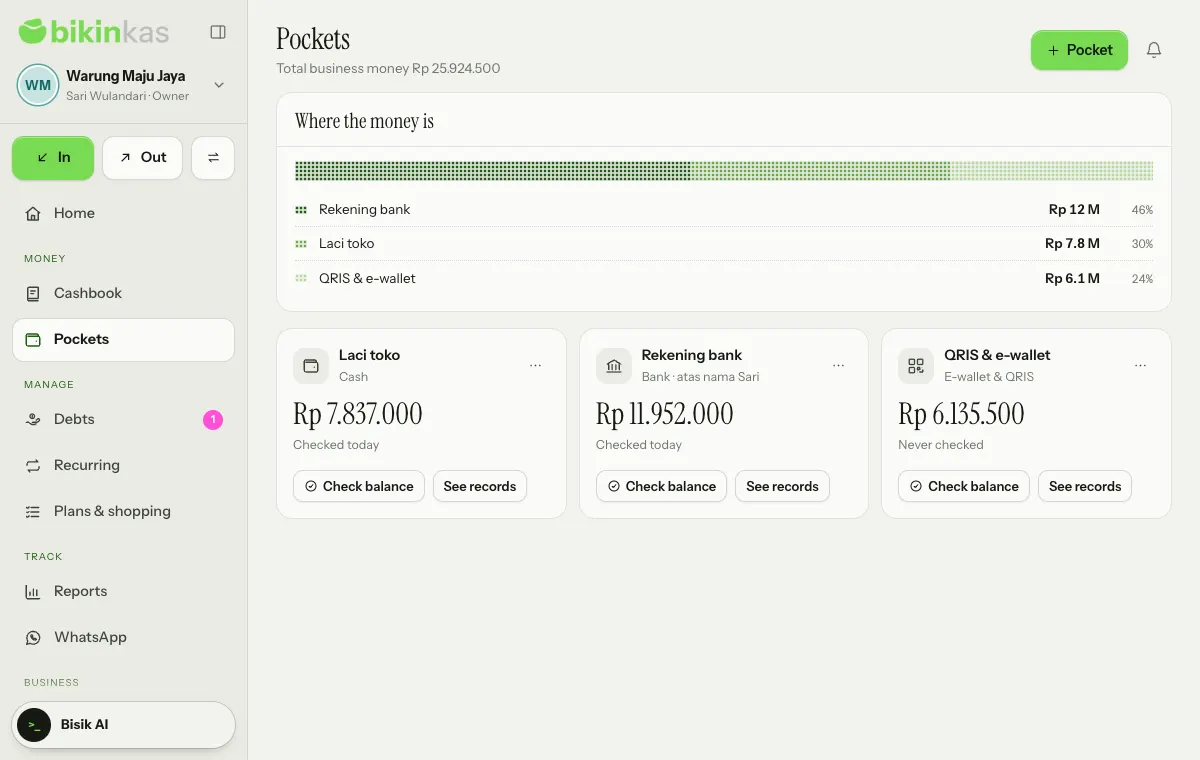
Pocket types
A pocket can be Cash, Bank, E-wallet & QRIS or Other. When you sign up, BIKIN KAS sets up pockets for your kind of business, such as Shop till, Bank account and QRIS & e-wallet for a small shop. See records on each card opens the Cashbook filtered to that pocket.
Adding and editing pockets
Owners and admins add a pocket with the Pocket button (New on phones) in the page header:
- Pick the Type.
- Enter the Pocket name, such as Shop till, BCA account or GoPay.
- Fill in Money that's there now. You can leave it empty and change it later.
- If you like, add a Description (optional), then choose Save.
The ⋯ menu on each card has Edit, Archive and Delete. Changing the Opening balance also changes that pocket's balance now. A pocket that already has records isn't deleted, only archived: it's no longer offered when recording, its old records stay, and you can use it again from Archived below the list with Make active again. The number of pockets follows your plan.
Check balance
Check balance matches the balance in the app with the money that's really there, for example after counting the till at the end of the day or looking at the bank statement. Owners, admins and bookkeepers can check.
- Choose Check balance on the pocket's card.
- See the balance According to BIKIN KAS, then fill in Money that's really there.
- If they match, BIKIN KAS says It matches. No difference.
- If they differ, the difference shows, such as "There is Rp 5.000 less than recorded." Leave Record the difference… ticked to record it as an adjustment in the Cash difference category, so the balance matches the money there again. Untick it if you only want to save the check while you look for the cause.
- Add a Note (optional), then choose Save check.
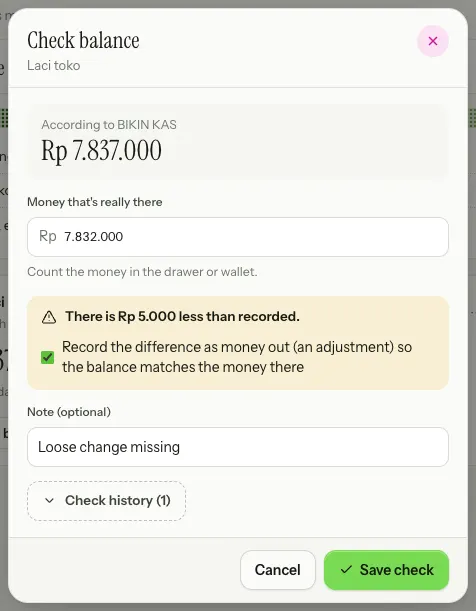
The Check history in the same sheet shows earlier checks: Matches, or the difference and whether it was recorded. Pockets not checked for more than 30 days show under To do on Home, and every difference reaches the bell of owners and admins.
Transfers between pockets
Money moving between your own pockets is recorded as a Transfer: with the transfer icon next to In and Out in the sidebar, Quick record › Transfer on Home, or Move between pockets in the total card's ⋯ menu. See Recording money.
Who sees what
Owners, admins, bookkeepers and viewers see the balances of every pocket opened for them. Cashiers only see the Pockets menu when the owner switches on Cashiers may see the balance of pockets opened for them in Settings › Business. Bookkeepers, cashiers and viewers can be limited to some pockets in Team.
Last updated: