BIKIN KASFeatures
Debts
Record who still owes you and who you still owe, take instalments, share the details with a link, send reminders and receipts on WhatsApp, and manage contacts.
The Debts menu records money that hasn't been paid yet, both ways:
- To receive: someone owes you, such as a customer's or an employee's IOU, or a sale paid later.
- To pay: you owe someone, such as stock bought on credit from a supplier, or a loan.
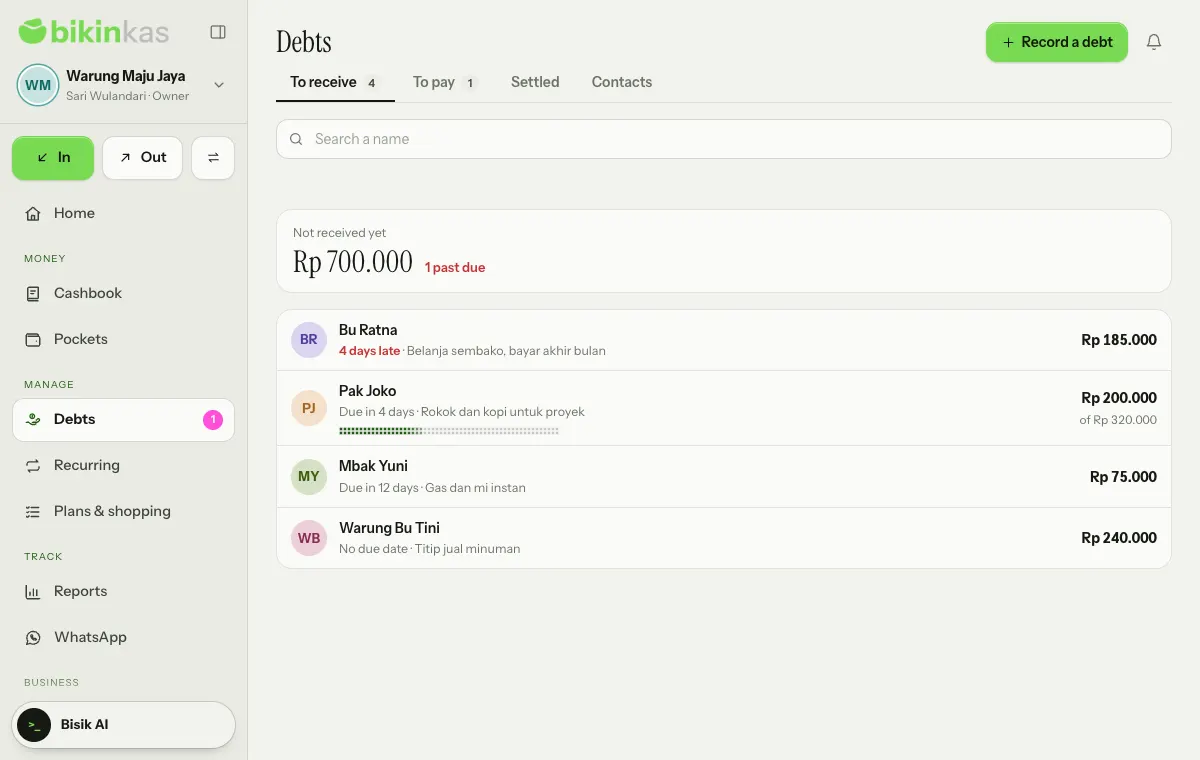
The Settled tab holds debts that are fully paid or cancelled, and the Contacts tab holds the people you've recorded. Search a name filters the list. Owners, admins and bookkeepers record debts and payments; viewers can only look; cashiers don't see this menu.
Recording a debt
- Choose Record a debt (New on phones), or New IOU and New debt under Quick record › More on Home.
- Choose Someone owes me or I owe someone.
- Pick the contact under Who owes you (or Who you owe), or choose New person to type a name and WhatsApp number (optional) right there.
- Enter the Amount and the Due date: None, 1 week, 1 month or Pick a date.
- Add a Note (optional), then choose Save.
Tick I'm handing over the money now when you lend cash: the loan is recorded as money out of the chosen pocket straight away. For a debt you owe, tick I'm receiving the money now when you receive borrowed money, which is recorded as money in. Leave it unticked for a sale or a purchase paid later, because no money has moved yet. The number of unpaid debts follows your plan.
Details and payments
Tap a name to open its details: what is still to be paid, a dotted bar of what has been paid, Recorded, Due date, the Reminders sent so far, and the Payments & records list.
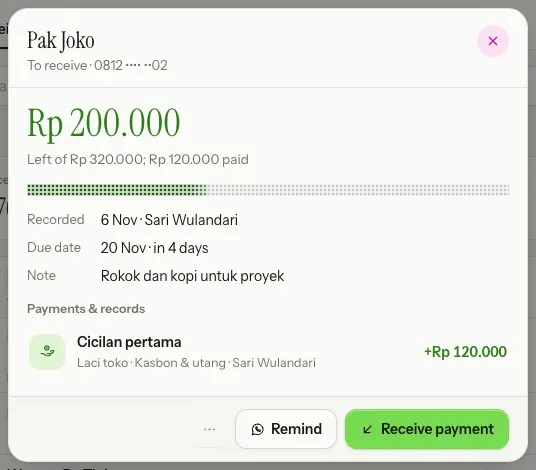
- Choose Receive payment for money owed to you, or Pay it for money you owe.
- Fill in Paid now, or tap All Rp … or Half. Payments can come in parts.
- Pick the pocket and the date, then choose Save.
The payment becomes a money-in or money-out record linked to the debt, and what's left goes down; once it reaches zero, the debt moves to Settled. The ⋯ menu in the details has Edit, Share details, Send a receipt for the last payment (for debts whose contact has a number) and Cancel it. A cancelled debt moves to Settled as Cancelled; payments already recorded stay in the Cashbook, and Reopen brings it back.
Sharing the details with a link
The person who owes you can check for themselves what's left to pay. In the details, choose ⋯ › Share details, then switch on Share with a link.
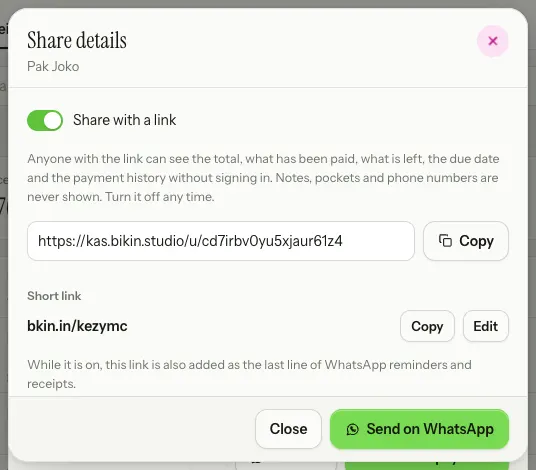
- Copy copies the link. The bkin.in short link below it can be copied too.
- Send on WhatsApp opens WhatsApp with a message containing the link, ready to send.
- The link opens a read-only page without signing in: the business name, the person's name, the status (Not paid yet, Past due, Paid or Cancelled), what is still to pay, the recorded and due dates, the History (Debt recorded and each Payment), and the total, what has been paid and what is left. Notes, pockets and phone numbers are never shown.
- While the link is on, the details show Details link · Being shared, and the link is added as the last line of WhatsApp reminders and receipts.
Debts you owe can be shared the same way, for example with the supplier you buy from on credit.
Reminders and receipts on WhatsApp
For money owed to you, the Remind button opens Remind on WhatsApp:
- Choose the message: Polite, Short or With details. The name, the amount left and the due date fill in by themselves.
- Check the preview, then choose Send when your business WhatsApp number is connected, or Open WhatsApp to send it from WhatsApp on this device.
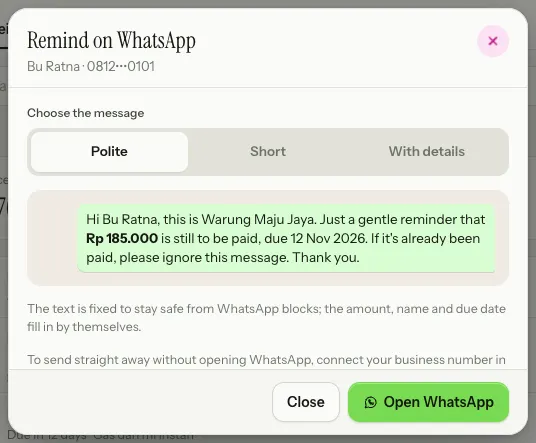
The text is fixed, with no free-text box, and each debt can be reminded at most once a day. Messages only go to contacts whose number is saved.
After Receive payment on a debt whose contact has a number, the notice has a Send receipt button. The Send a receipt sheet holds a fixed text: a thank-you, the amount paid, the date, and what is left or that it's fully paid. One receipt per payment. Sending straight from your business number is on plans with Debt reminders from your business WhatsApp number; without it, choose Open WhatsApp. See WhatsApp.
Contacts
Contacts don't have their own menu; manage them in the Contacts tab. Contacts are also created as you record a debt for a New person. Choose Contact to add one, or tap a name to change the Name, WhatsApp number (optional) and Note (optional). Each contact shows how much is still to receive or to pay.
WhatsApp numbers are only used for the reminders and receipts you send yourself. A contact with unpaid debts isn't deleted, only archived.
Due-date reminders
Every morning, debts due tomorrow, today or already late reach the bell of owners, admins and bookkeepers. See Settings.
Last updated: