BIKIN KASAccount & plan
Team & roles
The five BIKIN KAS roles (owner, admin, bookkeeper, cashier, viewer), limiting access to some pockets, inviting your team, profile photos, and the log of important actions.
Every team member has one role. Roles and pocket access are checked on the server for every request, so what isn't allowed can't be opened through a direct address either.
Five roles
| Role | Can |
|---|---|
| Owner | Everything, including the plan, adding businesses, WhatsApp, the log and closing the account |
| Admin | Everything except the plan, adding businesses and closing the account |
| Bookkeeper | Records, edits and deletes entries; transfers; debts; recurring records; plans and shopping lists; balance checks; reports and exports; contacts; WhatsApp reminders. No team or business settings |
| Cashier | Records money in and out in their pockets, sees and fixes their own entries for the day, and ticks off shopping lists. No totals, reports or debts |
| Viewer | View only: Home, Cashbook, Pockets, Debts, Recurring and Reports |
Only the owner gives the owner or admin role, changes roles, connects the WhatsApp number, switches on Record from WhatsApp, opens the log and lets cashiers see balances. In a group of businesses, the plan, referrals and deleting added businesses are for the owner of the main business only.
Inviting your team
Owners and admins invite teammates from the Team menu:
- Choose Invite.
- Fill in the Name and Email, then pick a Role. Each role explains what it can do.
- For bookkeepers, cashiers and viewers, pick their pockets under Pocket access if their access should be limited; none picked means every pocket.
- Leave Email an invitation (temporary password made for you) on. Your teammate gets an email with a temporary password. If you switch it off, fill in the Temporary password and share it yourself.
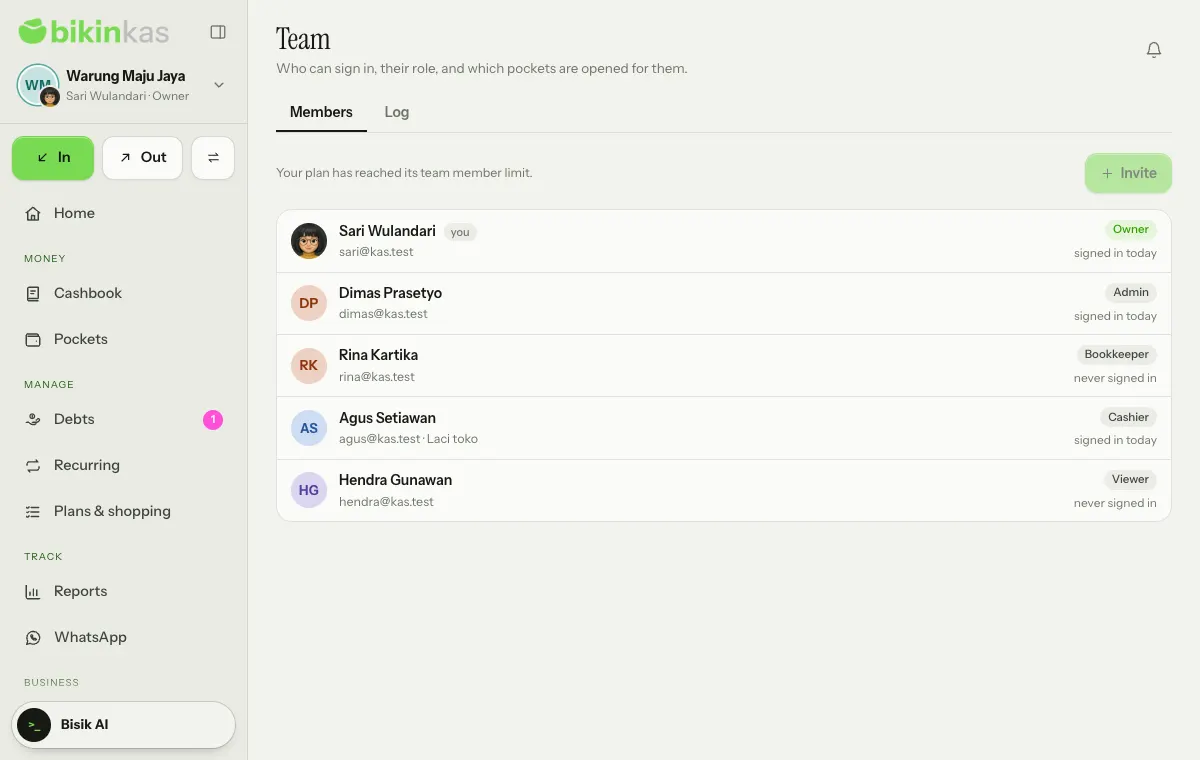
Admins can invite bookkeepers, cashiers and viewers. Tap a member to change their name, role, pocket access, or to switch them off (Inactive (can't sign in)). Changing a role asks for a code from your email. The number of team members follows your plan.
Access to some pockets
Bookkeepers, cashiers and viewers can be limited to some pockets, such as a cashier who only handles the Laci toko till. They only record and see in the chosen pockets, also on Home, in the Cashbook, in Reports and in Bisik's answers. Owners and admins always see every pocket.
By default cashiers don't see balances or totals. The owner can switch on Cashiers may see the balance of pockets opened for them in Settings › Business, on the Balances for cashiers card.
Profile photos
Everyone can upload their own profile photo in Settings › Account, on the Profile photo card: choose Upload photo, adjust it, then save. The photo shows small in the corner of the business avatar at the top of the sidebar and in the Team list, only to people in this business, and is deleted when the person is switched off or their account is deleted. Remove photo goes back to your initials.
Log
The Log tab in the Team menu (owner only) records role changes, records deleted or restored, balance check differences, record locks, exports and settings changes, with who and when. Important actions such as CSV exports, deleting, locking records and changing roles ask for a code from your email.
Last updated: