Bikin HRFeatures
Bisik
Bisik is the AI assistant in Bikin HR that answers questions about employees, documents, attendance, leave and pay, within the asker's role.
Bisik is the AI assistant inside Bikin HR. Ask in everyday words, for example "send Irwan's ID card" or "how much leave do I have left?", and Bisik answers from your company's data, within what you are allowed to see.
Open Bisik
The Bisik AI button sits at the foot of the sidebar, under the menu. Tap it to open the chat panel on the right of the screen. At the start, Bisik greets you and offers a few example questions that fit your role.
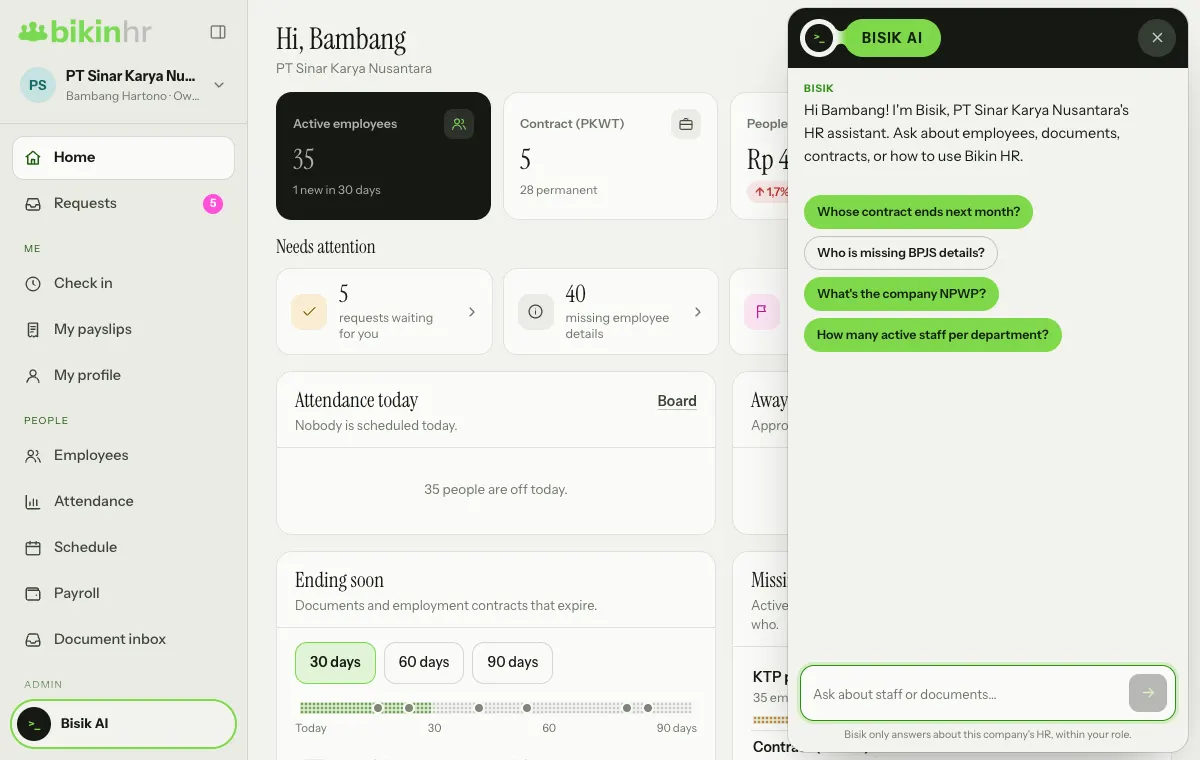
- Ask: tap an example question, or type in the Ask about staff or documents… box and press send.
- Stop an answer: while Bisik is writing, the send button turns into Stop.
- Start over: press the eraser icon (New chat) in the panel header. It appears once you have asked something.
- Close the panel: press × at the top right of the panel, or tap the Bisik AI button again.
Bisik is available on every plan, including Free. How many questions you can ask each month depends on your plan: Free is enough to try it, paid plans give more. When this month's allowance is used up, Bisik tells you, and the owner can upgrade the plan in Settings › Plan.
What you can ask
| Role | Example questions |
|---|---|
| Owner, HR admin | "Whose contract ends next month?", "Who is missing BPJS details?", "What's the company NPWP?", "How many active staff per department?", "Send Irwan's ID card" |
| Finance | "Whose bank account is missing?", pay run summaries, people cost, cash advance status |
| Manager | Their team's attendance and leave, who is often late, requests waiting for their approval |
| Employee | "How much leave do I have left?", "My payslip from last month", "Send my contract", "Which of my documents expire soon?" |
Bisik can also explain how to use Bikin HR, for example "How do I change my password?".
Things Bisik can answer include: employee and company details, documents and contracts about to end, today's attendance and monthly recaps, who is often late, leave balances, who is away, pending requests, overtime summaries, cash advances, warning letters in force, your own payslips, pay run summaries, people cost and THR estimates.
Documents in the chat
When you ask for a document ("send Irwan's ID card"), Bisik shows it as a document card in the chat, with the type, owner, masked number and expiry. Press Open to open the file. As elsewhere in the app, opening the file asks for a code from your email, and every document request to Bisik is written to the access log.
Bisik's limits
- Only within your role. Bisik uses the same access rules as the app. Managers can't ask about their team's pay or ID documents; employees can only ask about themselves.
- Sensitive values stay masked. NIK, family card no., NPWP, bank accounts and pay are never written in full in the chat; full values can only be opened in the app.
- Read only. Bisik never changes, adds or deletes data. To request leave or change data, use the menus.
- Only about this company. Bisik declines questions outside your company's HR.
- Use is limited. There is a monthly allowance that follows your plan, counted across every company in the group. If you or your company have asked a lot that day, Bisik asks you to try again tomorrow.
Bisik's answers come from the data in Bikin HR. If an answer is empty or odd, first check that the data is filled in, such as contract end dates or document expiry dates.
Bisik in other BIKIN apps
Bikin HR can also be connected to BIKIN AI and BIKIN SIGHT, so the AI there understands a summary of your team. See Connected apps.
Last updated: