BIKIN SPRINTFeatures
Bisik in BIKIN SPRINT
Bisik is the AI assistant in BIKIN SPRINT. It answers about projects and tasks and breaks a brief into task drafts, within the projects you may see.
Bisik is the AI assistant inside BIKIN SPRINT. It answers questions about the projects and tasks in your workspace and explains how to use BIKIN SPRINT. Bisik is on every plan, including Free. How many questions you can ask each month depends on your plan: Free is enough to try it, paid plans give more. When this month's allowance is used up, Bisik tells you, and the owner can upgrade the plan in Settings › Plan.
Opening Bisik
Choose the Bisik AI button at the foot of the left sidebar. The panel opens from the right edge (full screen on a phone) and greets you with a few example questions. Tap one, or type your question in the Ask about projects and tasks… box and press Enter.
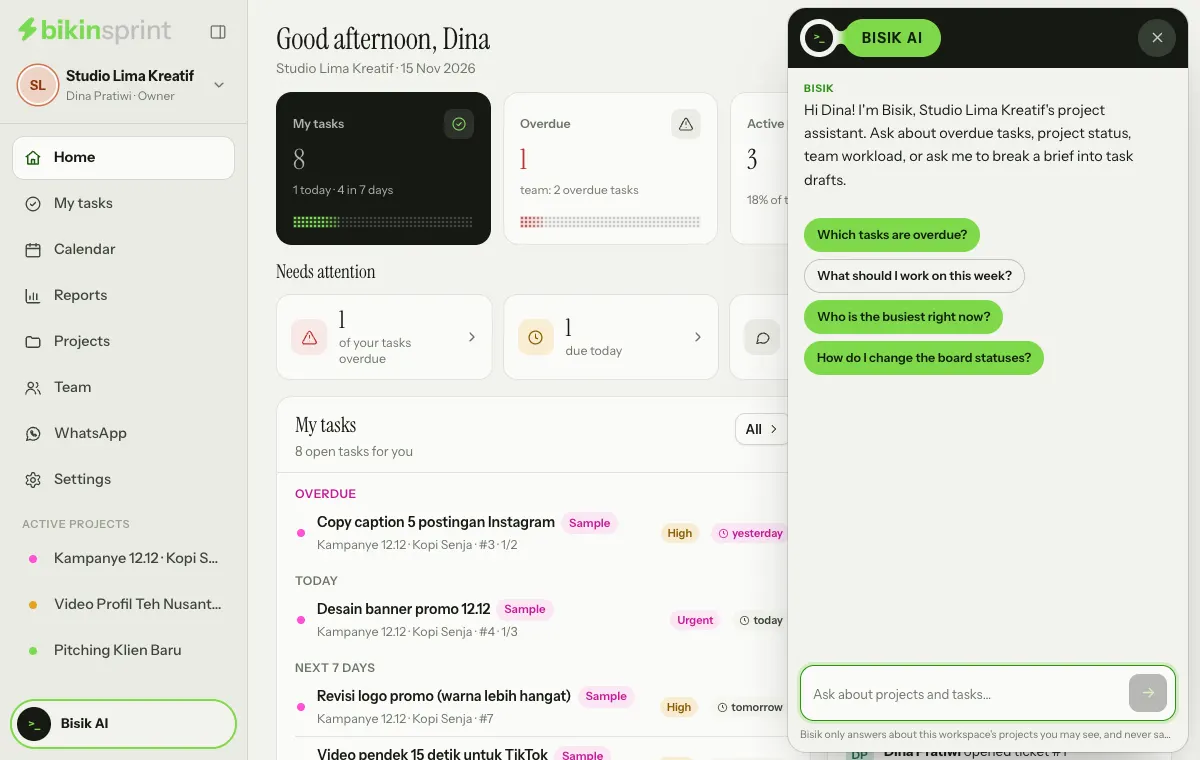
While Bisik looks things up, you see Bisik is looking at your projects…, and the send button turns into a stop button if you want to cancel. The eraser icon (New chat) in the panel header starts the conversation over, and × closes the panel. Closing the panel keeps the conversation as long as the page isn't reloaded.
What you can ask
- "Which tasks are overdue?"
- "What should I work on this week?"
- "How is the 12.12 campaign project going?"
- "Who is the busiest right now?"
- "What's in task #12?"
- "How do I change the board statuses?"
Task drafts from a brief
Paste a brief and ask Bisik to break it down, for example "split this brief into tasks in the 12.12 campaign project, due Friday". Each draft appears as a Task draft card with its project, due date and person; you can edit the title first. Bisik never saves anything by itself: you press Save task, then the card shows Saved and the task lands in its project.
Within your access
Bisik reads with the same rules as the app. It only answers about the projects you may see: open projects, the private projects you joined, or every project if you're the owner or an admin. Bisik only reads; it doesn't change data.
Privacy
Conversations with Bisik live only on the open page and aren't stored on our servers. To answer, Bisik sends your question and the data it looked up to the AI model provider, which doesn't use it to train models.
Accuracy
AI answers can be wrong. Check answers and drafts before you use or save them.
Last updated: