BIKIN SALESFeatures
WhatsApp capture
WhatsApp capture in BIKIN SALES finds leads, prospects and sales in your business WhatsApp number's private chats. Only sales messages are kept, and you decide what happens next.
Many sales start in a WhatsApp chat: people ask for prices, request a quotation, place an order or say they've transferred. WhatsApp capture finds those messages in your business WhatsApp number's private chats and shows them as cards on the WA capture page, so no lead slips through. Messages that aren't about sales are never stored.
Turning it on
- First connect your business WhatsApp number in Settings › WhatsApp (see Link, email & WhatsApp).
- On the WhatsApp capture card on the same page, the owner turns on the switch at the top right of the card.
- Read the explanation on the Turn on WhatsApp capture? sheet, choose Turn on, then enter the code from your email.
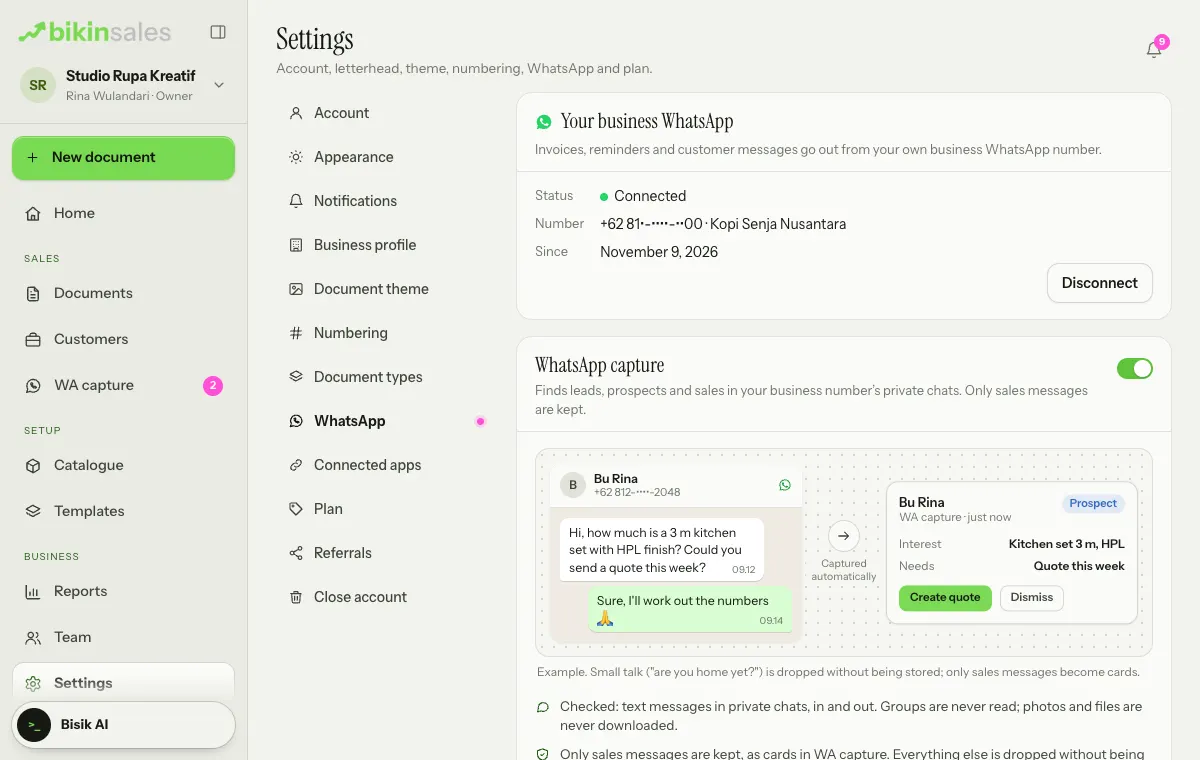
It's off by default, and only the owner can turn it on or pause it. This feature is available when your plan includes it; on other plans the card carries an Upgrade badge. The AI checks per month follow your plan; when they're nearly used up the card says so, and when they run out, capture stops until the next month.
The WA capture menu
The WA capture menu (sidebar, Sales group) is always there for the owner, admins and sales staff allowed to see captures, even before your plan includes WhatsApp capture, the business number is connected or capture is turned on. Until capture can run, the page explains why, with a short example of a sales chat turning into a capture card:
- WhatsApp isn't part of your plan: the owner sees a See plans button; others are told the business owner can upgrade.
- WhatsApp isn't connected yet: the owner sees a Connect WhatsApp button that opens Settings › WhatsApp; others are told the business owner can connect it.
- WhatsApp isn't available right now: BIKIN is setting up or maintaining the connection. Try again later.
- WhatsApp capture is off: the number is connected, but the capture switch isn't on yet. The owner sees Open WhatsApp settings.
If there are captures already and the number then drops or your plan no longer includes WhatsApp capture, a one-line note shows above the list, and the existing captures stay visible.
What's checked and what's kept
- What's checked: text messages in that number's private chats, both incoming and the ones you send from your phone. Groups, status updates and channels are never read. Photos and files are never downloaded; only their captions are checked.
- How it's checked: messages without sales signs (such as prices, ordering, stock, shipping, deposits, transfers or quotations) are dropped at once. Messages with sales signs are read by AI, text only and without the number, to confirm what they are:
- Lead: someone new asking or interested,
- Prospect: asking for a price, a quotation or a deal,
- Sale: an order placed, a deal closed or a payment.
- What's kept: only messages that are clearly about sales, as capture cards with a quote of the message, its direction and time, the WhatsApp number and name, and the details read from it (name, product or service, quantity, price and date). Messages from the same number within 24 hours are merged into one card.
Other messages are never stored. The WhatsApp capture card in Settings only shows how many messages were checked and kept today.
Following up captures
Open WA capture in the Sales menu group. The number of new captures shows on the magenta menu badge and on the Needs attention tile on Home. Filter by type with All, Lead, Prospect and Sale above the list.
Each card shows the type, the WhatsApp name and number, a summary, the details read (for example product, quantity and price) and a quote of the latest messages, including replies from your business number.
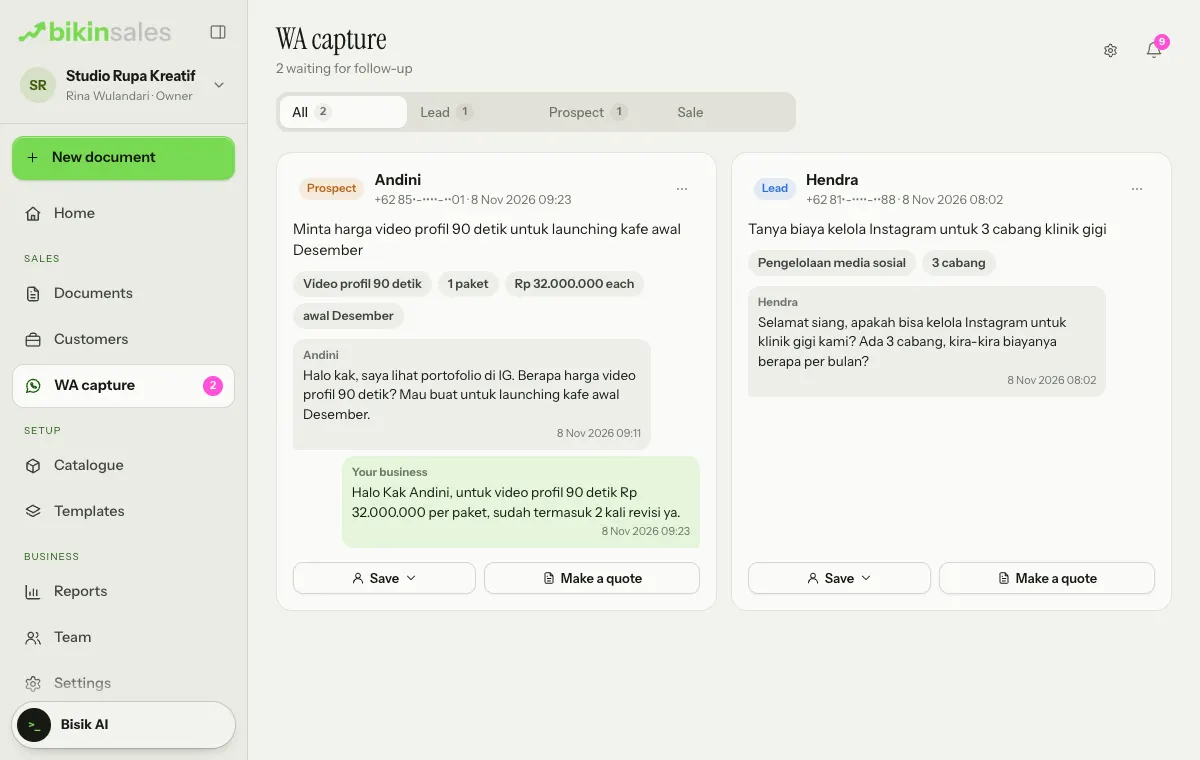
Choose an action at the foot of the card:
- Save: choose Lead, Prospect or Customer to save the number as a registered customer at that stage, or Attach to an existing customer… so the capture becomes a "From WhatsApp" note on that customer. When the number already belongs to a registered customer, the button becomes Note on customer.
- Make a quote or Record the sale (Sale captures only): a draft quotation or sales receipt is filled in from the details read. Items are matched to your catalogue, and the price mentioned in the chat is used.
In the ⋯ menu at the top right of the card:
- Dismiss: the capture is deleted at once.
- Stop capturing this number: the capture is deleted, and messages from that number aren't checked again.
Drafts made from a capture are still checked and issued by you.
How long captures stay and who sees them
- Captures left untouched are deleted automatically after 14 days. The ones you accept become notes on the customer or document.
- The Do not capture list stores a fingerprint of each number, not the number itself. The owner can clear it in Settings › WhatsApp (Clear).
- Captures are visible to the owner, admins and sales. The owner can turn off Sales may see and follow up captures on the WhatsApp capture card.
Your business's responsibility
Your business is responsible for that number and its customers' messages. Let customers know if needed that sales messages are recorded; BIKIN only processes messages on your business's behalf. Captures can be wrong or missed, so check them before saving them as customers or making documents from them. Details are in the Privacy Policy.
Last updated: