Bikin AsetFeatures
Notifications & reminders
The bell, device push and email for damage reports, assets handed to you, asset checks assigned to you, and daily reminders about maintenance, documents, warranties and loans.
The bell
The bell at the top right of every page holds your notifications: new damage reports, assets handed or lent to you, your damage reports being handled or fixed, asset checks assigned to you, and daily reminders. Tap a notification to open its asset, or choose Mark all read. The bell works on every plan.
Daily reminders
Every morning from 07.00 WIB, Bikin Aset checks:
- maintenance due within a week, due today or overdue;
- documents entering their reminder window, expiring today or already expired;
- warranties ending within 30 days or today;
- loans due back today or overdue.
The reminders reach the bell of the people who manage that asset: the owner, admins and asset managers for their locations. Loan reminders also go to the holder. Each item is flagged at most once a day.
Choosing how you hear about things
In Settings › Notifications everyone chooses for themselves. The bell is always on; email and push can be turned on or off.
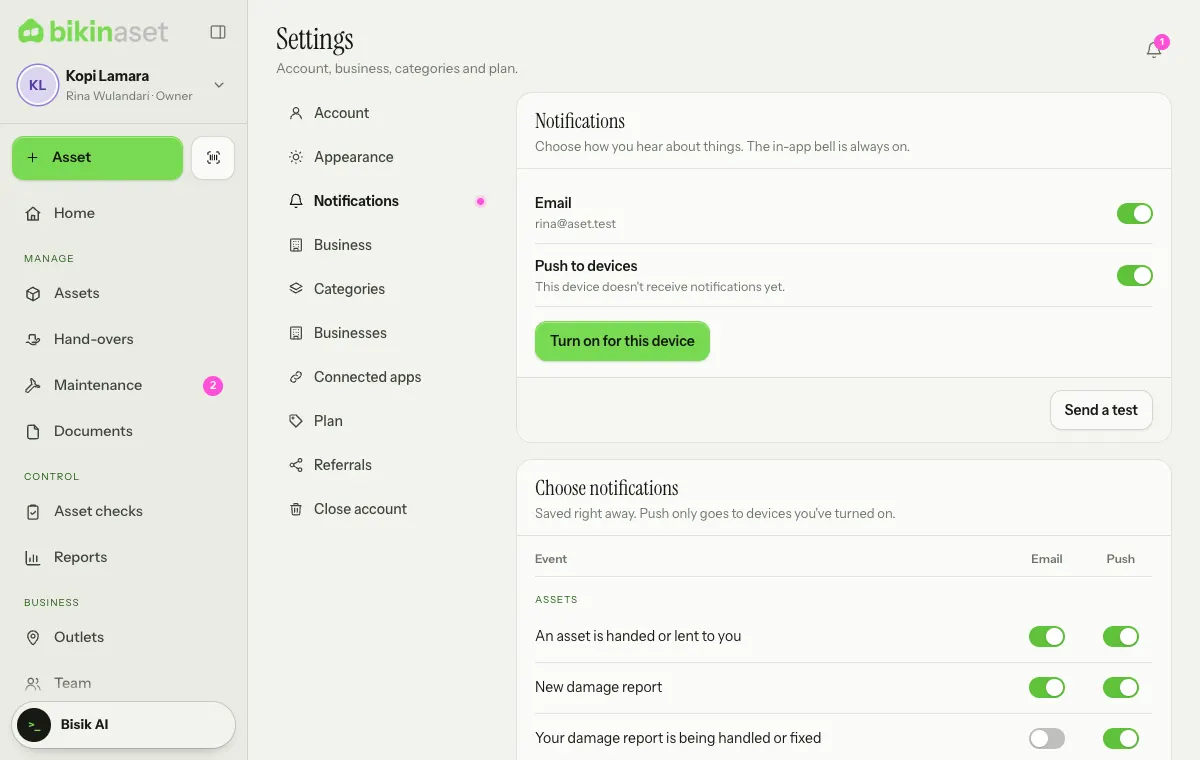
- Email goes to your account address. Pick which events are emailed under Choose notifications.
- Push to devices: tap Turn on for this device, then allow it in the browser. Do this on every phone or computer that should receive notifications. On iPhone, push only works once Bikin Aset is on the home screen (Share › Add to Home Screen).
- Send a test sends one test notification to your active devices and to your email.
Email reminder digest
Daily reminders can also arrive as one email summary a day, without asset values. The digest is part of paid plans with the Email reminder digest feature, and only goes to people who turned on email for Daily reminders: maintenance, documents, warranties, loans in Settings › Notifications. On other plans, reminders still reach the bell, and push if you turned it on.
How many days before expiry a document is flagged is set per document; the default for new documents is in Settings › Business › Reminders.
Last updated: