Bikin AsetFeatures
Bisik in Bikin Aset
Bisik answers questions about your assets, holders, maintenance, documents and value within your role, and drafts new assets from text or receipt photos that you check and save yourself.
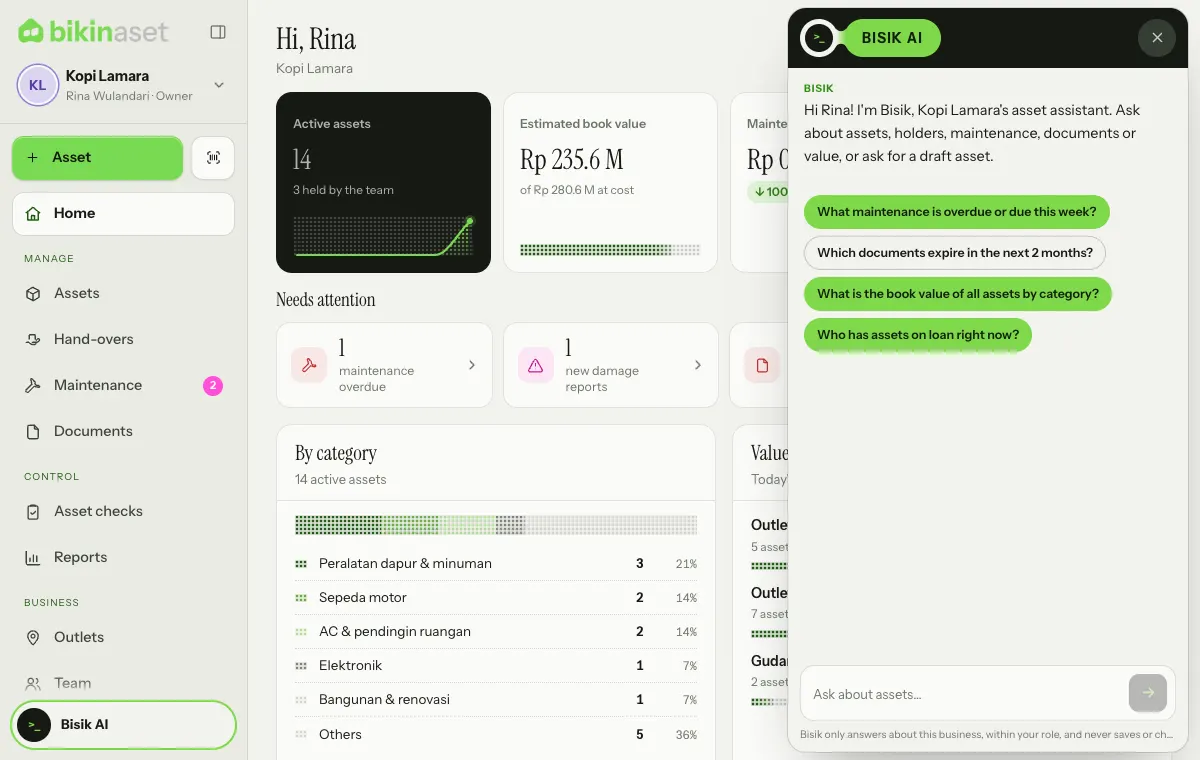
Bisik is the AI assistant in Bikin Aset, on every plan. Open it with the Bisik AI button at the bottom of the sidebar (on phones, in the sidebar drawer). How many questions you can ask each month depends on your plan: Free is enough to try it, paid plans give more. When this month's allowance is used up, Bisik tells you, and the owner can upgrade the plan in Settings › Plan.
What you can ask
- Maintenance: "What maintenance is overdue or due this week?"
- Documents: "Which documents expire in the next 2 months?"
- Holders: "Who has assets on loan right now?", "Which laptops does the team hold?"
- Value: "What is the book value of all assets by category?"
- How to use Bikin Aset, such as printing QR labels or starting an asset check.
Bisik only reads data your role may see. Asset managers limited to some locations only get answers about those locations, and staff only about the assets they hold, without prices unless the owner allows them.
Asset drafts
Ask Bisik to prepare a new asset, for example "record the Lenovo ThinkPad laptop we bought yesterday for Rp 12.5 million for the admin team". Bisik shows the draft as a card. Choose Open form to continue in a filled-in New asset form, check it, then save it yourself.
In the New asset form, Fill from a receipt photo lets Bisik read a photo or PDF of the purchase receipt and fill in the name, brand, price, purchase date, shop, receipt number and warranty. How many receipts AI reads per month also depends on your plan; when it's used up, fill in the form by hand for now.
Bisik never saves, edits, hands over or disposes of assets by itself. Every decision stays with you.
Privacy
Your question and the data needed to answer it are processed only to answer. Conversations aren't stored on our servers. See the Privacy Policy.
Last updated: