BIKIN AIAccount & plan
Privacy and security
How BIKIN AI protects your account and data - passwords, Google, shared chats, public websites, AI processing, and how to ask for account deletion.
This page sums up the practical side of account security and data privacy in BIKIN AI. The full terms are in the Privacy Policy and the Terms and Conditions.
Keeping your account safe
Your account's security settings are in the profile menu › Settings › General.
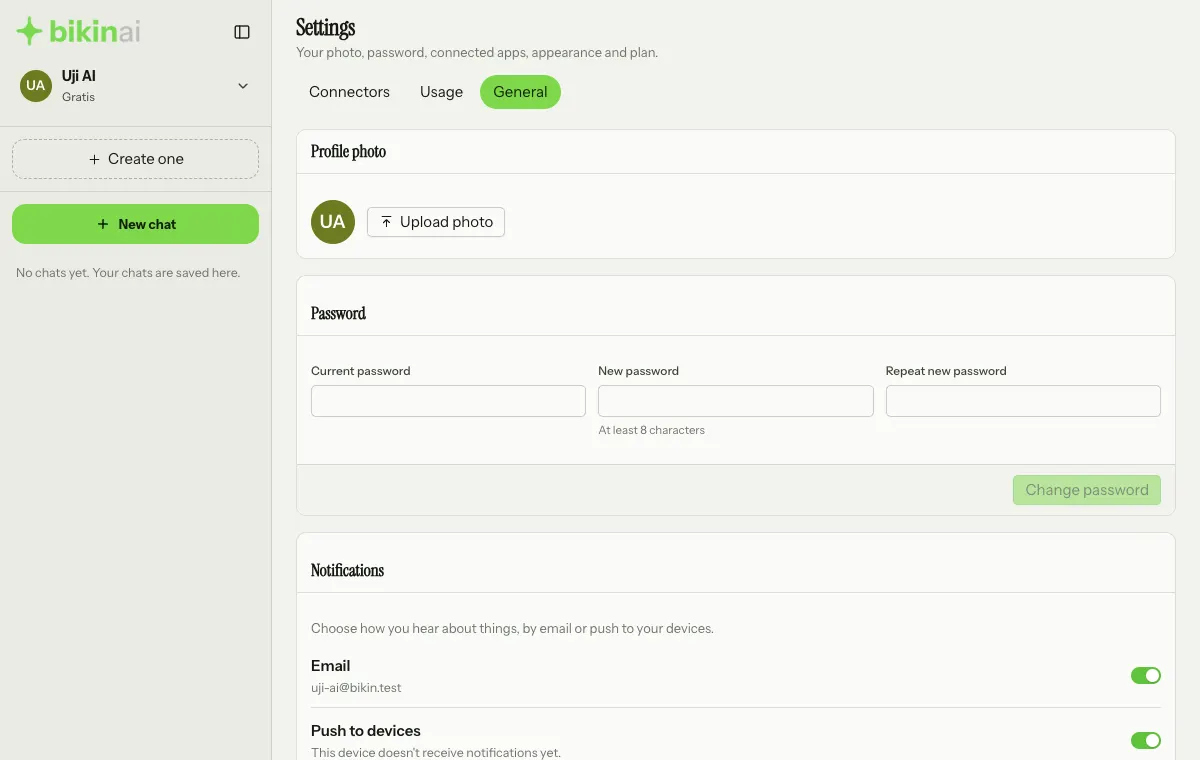
- Use a password of at least 8 characters that you don't use anywhere else. To change it, fill in Current password, New password and Repeat new password in the Password card, then press Change password. All other devices are signed out right away.
- Press Link Google account in the Sign in with Google card (below the Password card) to sign in with one tap. You can Unlink it any time in the same card.
- Don't share email verification codes with anyone, including the BIKIN team.
- Tick Keep me signed in for 30 days only on your own device, and press Sign out in the profile menu when you use a shared device.
The data you enter
- BIKIN doesn't sell personal data, doesn't show ads, and doesn't use your content to train AI models.
- To answer you, your messages, files and the data needed are sent to the AI model providers BIKIN uses. They process it on BIKIN's behalf and don't use it to train models.
- With Sign in with Google, BIKIN only receives your Google account's name, email address, profile photo and ID. Your Gmail, Drive, Calendar and contacts are never accessed.
- AI output can be wrong. Double-check important information before you use it.
What other people can see
| What you make | Who can see it |
|---|---|
| A normal chat | Only you |
| A shared chat | Everyone in it, including attachments |
| A shared presentation | Anyone with the link; not on Google unless you turn on Show on Google |
| A live website | Anyone who opens the address; search engines only when Show on Google is on |
You can stop sharing a presentation, take a website down, remove people from a shared chat, or make a new invite link at any time.
If you add a Google Analytics or Meta Pixel ID in your website settings, Google or Meta collect data about your website's visitors under their own terms, and you are responsible for telling those visitors.
Connected BIKIN apps
A connection to Bikin POS, Bikin HR, Bikin Fin, Bikin CRM, BIKIN SPRINT or BIKIN SALES only reads data, according to the role of the person who approved it, until it is disconnected in Settings › Connectors. Each app holds back its own sensitive data, for example identity numbers, bank accounts and files in Bikin HR, or customer contact details and message contents in Bikin CRM. The approval page in the app shows what is read before you press Allow. The details per app are in Connected BIKIN apps.
Deleting data
- Chats: the ⋯ button › Delete in your history. The chat is removed from your history on every device.
- Assets: delete them on the Assets page. A deleted asset also disappears from its chat and can't be restored.
- Websites: Take down (the ⋯ button on the website's row in the sidebar, or on the Assets page) to stop them being live.
An account keeps a limited number of chats; when it's full, the chats that haven't been updated for the longest are deleted.
Deleting your account
Account deletion can't be done yourself in the app yet. Send a request from your account's email to contact@bikin.studio. BIKIN deletes your account with its chats, websites and images within 30 days, except records the law requires us to keep, such as billing records.
At the same address you can also ask BIKIN to show, correct or export your data.
Removing BIKIN's access in your Google Account settings only stops Sign in with Google. Your BIKIN AI account and its data stay until you ask for deletion.
Last updated: